Showing posts with label Bus Functional Models. Show all posts

Sunday, April 18, 2021

SoC Integration Testing: Hw/Sw Coordination (Part 2)


Controlling the outside world -- specifically interface BFMs -- from embedded software is critical to SoC integration tests that exercise interface IP. In the last post, we showed how to pass data from embedded software to Python by tracing execution of the processor core and reading the mirrored values of registers and memory to obtain parameter values. While functional, doing things in this way is highly specific to one message-passing approach and is pretty labor intensive. In this post, we'll add some abstraction and automation to improve usability and scalability.


Design Goals


While we're initially focused on providing a nice automated way to communicate between embedded software and the test harness in a simulation environment, the design goals go beyond this. The diagram above shows the basic architecture. Endpoints provide a portal for one environment to call APIs in another environment. Each endpoint supports a known set of APIs, and different endpoints will support different sets of APIs. 

Each environment interacts with APIs on an endpoint without needing to know how communication is implemented. For example, execution trace might be used to implement processor to Python communication in a simulation-based environment. When the design is synthesized to FPGA, communication might be implemented via an external interface. With appropriate abstraction, neither the test software running on the processor nor the Python test code should need to change despite the fact that data is being moved in very different ways. 

In order for this to be feasible, we'll need to collect some meta-data about the APIs.


Example

I always find an example to be helpful, so let's look at the enhancements to the flow in the context of a simple example.


The diagram above shows the key elements of a very small SoC called Tiny SoC. We can test many aspects of integration using just software on the processor. For example, we can read registers in the peripheral devices and check that they are correct. We can carry out DMA transfers. But, we need to control the outside world when testing the full path from software through the UART and SPI devices.

Bus functional models (BFMs) or Verification IP (VIP) provide very effective ways to interact with interface protocols from testbench code. What we need in addition is a way to control these BFMs from the software running on the core in the design.


Capturing the API

Let's focus on the UART for now. Our UART BFM provides a detailed API for configuring individual attributes of the UART protocol (eg baud-rate divisor) and for interacting with the UART protocol a byte at a time. That's fine for IP-level testing, but is a bit too low-level for software-driven testing.

For software-driven testing, we want to instruct the BFM to do some reasonable amount of work and let it go. To help with this, the UART BFM defines a higher-level API intended for use by software. 

An example of that higher-level API is shown above. Calling the uart_bfm_tx_bytes_incr API causes the BFM to begin sending a stream of bytes starting with a specific value and incrementing. There is another API that instructs the BFM to expect to receive a stream of bytes sent by the software running on the processor.

To enable automation, we describe the Python API that we will call from embedded software using special annotations. We collect related APIs together in a class, and identify whether these methods are exported by the Python environment and will be called by the embedded software, or are imported by the Python and will be called by Python code. 


Since we want embedded software to call this API, the API is considered to be exported by Python. You can also see the configuration function that updates the UART's configuration (eg baud rate).

Each of the method parameters is given a Python3 type annotation. This enables the Python libraries to know the type of each parameter and collect the right data to pass when the functions are called. 

On the C side, we simply need to have functions with the same signature as what we've captured in the Python API definition.
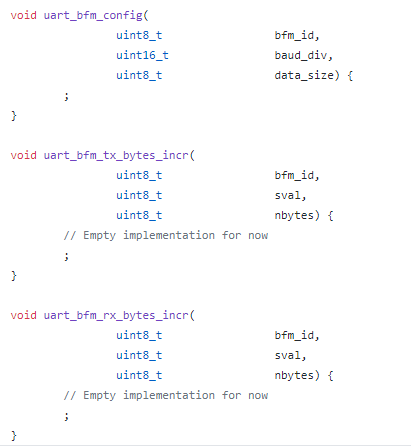

While the code shown above (link) is hand-coded, we could generate it automatically based on what is specified in the Python API definition. 


Connecting to Implementation: Python

Connecting all of this up on the Python side involves connecting the relevant BFMs and API implementations together. 
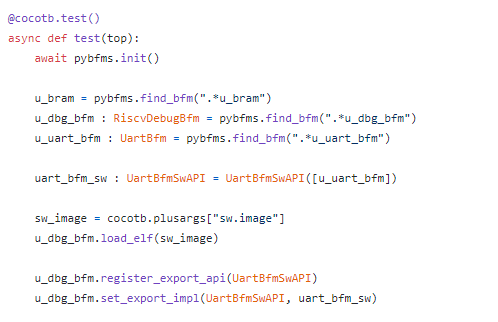

The snippet above is from the cocotb test that runs when a baremetal software test is run (link). At the beginning of simulation, the test locates the relevant BFMs. The u_dbg_bfm is the tracer BFM that monitors execution of software on the processor core. This BFM implements an Endpoint, as shown in the diagram at the beginning of the post. The u_uart_bfm is the BFM connected to the UART interface on TinySoC. 

Once we have all the BFMs, we can create an instance of the higher-level UART BFM API (uart_bfm_sw) and tell the debug BFM that it should handle the embedded software calling these APIs.


Example C-Test
With the BFMs connected on the Python side, we can now focus on how to interact with the BFM from the software test.
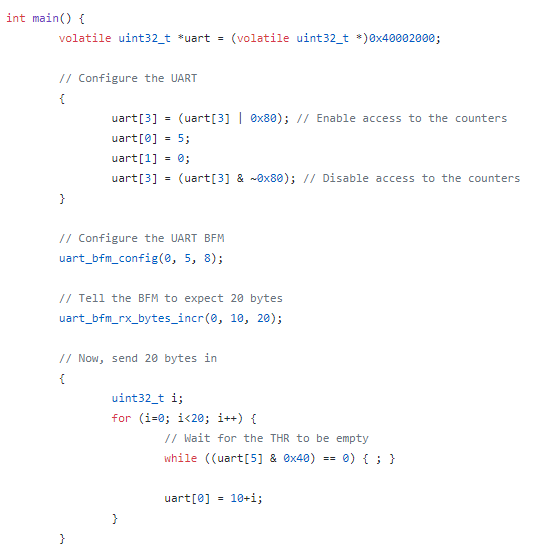
The software test snippet above transmits some data via the UART to the waiting UART BFM to check (link). Before we can send data, both the UART IP and the external BFM need to be configured in the same way. We program the UART IP via its registers, and call the uart_bfm_config function to cause the corresponding Python method to be invoked. This will cause the UART BFM mode to be configured.

Next, we call the uart_bfm_rx_bytes_incr to tell the UART BFM that it should expect to receive 20 bytes. It should expect the first byte to have a value 10 and subsequent bytes to increment by one. By telling the BFM what to expect, our test is self-checking and the required amount of interaction is small.

Finally, we again interact with the UART IP actually send the data that the BFM is expecting. 

Next Steps
The API definition and Endpoint architecture described in the post above provides a modular way to capture the APIs used to communicate across environments. Because the API signature is captured in machine-readable way, it also enables the use of automation when implementing the APIs for different environments. 

As I mentioned at the beginning of the post, the API and Endpoint architecture is designed so it can be applied in many verification environments -- it's certainly not restricted to just communicating between embedded software test and the test harness. I've been interested for a while in methodology for creating and verifying firmware along with the IP that it controls such that it's ready to go when SoC-integration testing begins. My next post will begin exploring how to create, verify, and deliver firmware along with an IP.

References


Disclaimer
The views and opinions expressed above are solely those of the author and do not represent those of my employer or any other party.

Saturday, February 8, 2020

Selectively Muting your BFMs to Speed up Simulation


Have you ever had the misfortune to be on the CC list for a "lively" email discussion where you're a stakeholder but only case about the conclusion? You can't simply ignore the traffic, because you do care about the conclusion to the discussion. But, it would be a significant time saver if you could just "tune out" all the discussion and simply be notified when a conclusion is reached.

I've been working with Python-based testbench environments (specifically cocotb) since the middle of last year. My first foray into contributing to cocotb was to implement a task-based BFM interface between the HDL environment and the Python environment (related blog posts here and here). The motivation was to increase simulation speed by reducing the number of interactions between the HDL environment and the testbench environment. In other words, allow the Python testbench to "tune out" what was happening in the simulation until the BFM came back with some useful conclusions.

The performance benefits of abstracting up and interacting at the task-call level come from maximizing the amount of time the simulation engine can run before it needs to check in with the testbench environment. Getting good performance also requires having the HDL environment generate clocks for the design, in addition to having Python interact with BFMs at the task level to drive stimulus against the design.

The performance benefits of this approach do vary a bit. If all of your tests interact with the design at the signal level and still only run for a small number of seconds each, then changing the way you interact with the simulation is unlikely to improve performance. A significant percentage of the time in your simulation runs is likely taken up by environment startup, and you might not really care about the run time anyway (what's a few extra seconds, right?)

For tests that run longer, though, the performance benefits can be quite significant. One of my projects is Featherweight RISC (FWRISC), a small RISC-V implementation. One of the Zephyr-OS tests that runs as part of the regression suite tests the ability to synchronize between multiple threads. Unlike the simple unit tests or compliance tests, this test runs for quite a while. Here, we see a pretty significant difference in runtime based on whether we interact with the simulation via signals or BFM tasks.

Scenario 
Time 
Icarus / Signal BFM 
17:06 
Icarus / Task BFM 
1:51 
Verilator / Task BFM 
0:06 

The table above compares running the same test in Icarus Verilog using signal-level interaction and in Icarus Verilog using task-based interaction. Simply switching to task-based interaction reduces the runtime by a factor of 9.2x! Moving from interpreted event-driven simulation to Verilator's two-state cycle-based simulation engine allows us even more speed.

Delegating Decisions to the BFM

This type of performance speed-up is quite nice, especially since the BFMs are quite simple. But, can we do better? In short, the answer is yes. We just need to continue down the path of reducing the number of interactions between simulation and testbench environment.

With task-based BFMs, quite a few decisions are already handled locally. For example, a UART BFM will typically handle the details of transmitting/receiving a byte, allowing the testbench to only interact with the BFM at byte boundaries.

There are cases, however, where a bit more flexibility is required. For example, an AMBA AXI BFM may handle all details of burst and phase timing under normal circumstances. Sometimes, however, the testbench might need to take fine-grained control for testing corner cases. Always interacting at the detail level will hurt performance of the common case. The solution is to have multiple (two in this case) operating modes for the BFM that allow us to have the highest performance for the common case, and fine-grained control (with lower performance) in the cases where this is needed.

Selective Muting Example: FWRISC Tracer 

Featherweight RISC has an execution-trace monitor built it. This is used by most of the regression-suite tests for checking. I've also found it quite helpful in debugging issues above the signal level. For example, when doing initial Zephyr OS bring-up, it was really helpful to be able trace function entry/exit in the log.

The FWRISC monitor issues three types of events:
  • Instruction executed
  • Register write
  • Memory write
Unit tests use all of these events to verify proper operation of the FWRISC core. However, as we move to running higher-level software, many of these events aren't needed. For example, when running Zephyr tests, we're running a not-insignificant amount of software. We definitely don't care to know about every register write. We would only care when debugging the most-obscure of issues! Zephyr can be configured with a buffer-based console, so we do care about some memory writes. However, not the majority. In most cases, we can tell if a test passed from the console output. If, however, we're debugging a test under Zephyr, we might care about function calls. But, we don't need to know about every executed instruction.

Muting Register Writes

The simplest event to disable turns out to be register writes. This is because our level of choice is binary: we only need to enable or disable tracing on register writes.

@cocotb.bfm(hdl={
    bfm_vlog : bfm_hdl_path(__file__, "hdl/fwrisc_tracer_bfm.v"),
    bfm_sv : bfm_hdl_path(__file__, "hdl/fwrisc_tracer_bfm.v")
    })
class FwriscTracerBfm():

    # ...

    @cocotb.bfm_import(cocotb.bfm_uint32_t)
    def set_trace_reg_writes(self, t):
        pass

The Python side of this control is shown above. Specifically, we declare a Python method in the BFM class that will act as a proxy for a task in the SystemVerilog BFM. 

module fwrisc_tracer_bfm(
                input                   clock,
                input                   reset,
                // ...
                );
    reg    trace_reg_writes = 1;

    task set_trace_reg_writes(reg t);
        trace_reg_writes = t;
    endtask

    always @(posedge clock) begin
        if (rd_write && rd_waddr != 0) begin
            if (trace_reg_writes) begin
                reg_write(rd_waddr, rd_wdata);
            end
        end
    end

    // ...

When the user's code calls the set_trace_reg_writes in the Python code, the correspond SystemVerilog task shown above will be called. This very simple task simply update the value of a flag within the BFM that controls whether register-write events are propagated to the testbench. This flag is checked when the BFM detects a register write, and the testbench is notified only if register writes are currently enabled.

Controlling Instruction Tracing
We need a bit more control over how instruction tracing. For unit tests, the testbench wants to be aware of all instructions that are executed. When debugging compliance tests, we want to be aware of all branches. When debugging Zephyr tests, we want to be aware of function calls.

@cocotb.bfm(hdl={
    bfm_vlog : bfm_hdl_path(__file__, "hdl/fwrisc_tracer_bfm.v"),
    bfm_sv : bfm_hdl_path(__file__, "hdl/fwrisc_tracer_bfm.v")
    })
class FwriscTracerBfm():

    @cocotb.bfm_import(cocotb.bfm_uint32_t, cocotb.bfm_uint32_t, cocotb.bfm_uint32_t)
    def set_trace_instr(self, all_instr, jump_instr, call_instr):
        pass

On the Python side, not much difference here. We're simply passing more parameters to the SystemVerilog side that reflect the additional controls we wish to have over being notified when an instruction executes.

module fwrisc_tracer_bfm(
    input  clock,
    input  reset,
    // ...
    );

    // ...

    reg trace_instr_all = 1;
    reg trace_instr_jump = 1;
    reg trace_instr_call = 1;

    task set_trace_instr(reg all, reg jumps, reg calls);
        trace_instr_all = all;
        trace_instr_jump = jumps;
        trace_instr_call = calls;
    endtask

    always @(posedge clock) begin
        if (ivalid) begin
            last_instr <= instr;
  
            if (trace_instr_all 
                || (trace_instr_jump && (
                    last_instr[6:0] == 7'b1101111 || // jal
                    last_instr[6:0] == 7'b1100111))  // jalr
                || (trace_instr_call && (
                    // JAL with a non-zero link target
                    last_instr[6:0] == 7'b1101111 ||
                    last_instr[6:0] == 7'b1100111) && last_instr[11:7] != 5'b0)
               ) begin
                instr_exec(pc, instr);
            end
        end
    end

    // ...

endmodule

The more-interesting part, not surprisingly, is on the SystemVerilog side. The block that recognizes that an instruction has completed now needs to make a few more decisions before determining whether the testbench should be notified. Specifically, we check the last instruction executed to determine whether it was a jump, or whether it was a call. In the RISC-V ISA, the only difference between a jump and a call is that a jump will not specify a link register to store the return address.

Even here, the code isn't too complicated. The BFM also contains code that checks memory-write addresses against a series of user-specified address regions, and only passes on writes that are within one of this regions. I'll omit this code, since you probably get the idea by now...

So, what is the impact? Well, right around 2x in the FWRISC testbench! One of the example applications that comes with Zephyr is an implementation of the Dining Philosophers problem. It's actually a fun test to run because it doesn't just print text, it generates animations! Because this test is multi-threaded, and because it involves time delays, it can be somewhat time-consuming to run in simulation. 

Scenario 
Time 
Verilator / Task BFM (Full) 
1:05 
Verilator / Task BFM (Min) 
0:24 

The table above compares the time needed to run this test with the BFM issuing all events to the testbench (Full), and the time needed when only minimum events are issued (Min). It's hard to ignore an improvement of this magnitude, achieved simply by addition of a little bit of logic in the BFM to allow it to locally make more intelligent choices on whether to notify the testbench of activity. 

You can even see the difference visually in the two videos below. In both cases, the video runs to the same point in the test (same text displayed), and then the video repeats. The video on the left shows a run with the BFM forwarding all events to the testbench. This run takes about 12 seconds to get to the defined point in the test. The video on the right shows a run with the BFM only forwarding key events to the testbench. This run takes about 6 seconds to get to the defined point in the test.
BFM (Full Activity) BFM (Selectively-Muted Activity)


Conclusion
Enabling BFMs to make more decisions locally about when an event is truly of interest to the testbench can have a significant beneficial impact on performance. I've illustrated this technique using Python as a testbench language running in event-driven and cycle-driven simulation engines. However, this approach applies to other testbench languages (eg SystemVerilog) and other execution platforms (eg Emulators, FPGA prototypes). Next time you write a BFM (whether general-purpose or special-purpose), consider what degree of intelligence to embed in the BFM and which categories of events you may want to selectively "mute" in exchange for increased throughput.


Disclaimer
The views and opinions expressed above are solely those of the author and do not represent those of my employer or any other party.