Showing posts with label SystemVerilog. Show all posts

Sunday, January 23, 2022

Documenting SystemVerilog with Sphinx


I've been digging into a project over the last few months whose value proposition is to simplify the process of connecting simulation-like environments and things like reference models, testbench languages, etc. I'll write more (likely much more) about this project in the future. This post, however, is about documentation and, specifically, documentation for SystemVerilog code.

As you can imagine, SystemVerilog support is critical for a project that connects into simulation environments. SystemVerilog and UVM currently are, after all, the most widely-deployed solution for block- and subsystem-level verification. But, support for other languages (C, C++, Python, etc) are important as well. Consequently, when it comes to documenting APIs, I need to cover a fair amount of ground.


Sphinx for Documenting Code

I've been using Sphinx Documentation Generator for the last couple of years. Sphinx accepts input formatted with reStructuredText  mark-up and generates formatted output in HTML, PDF, and several other formats. Sphinx has a wide variety of plug-ins that help to make formatting different types of document content more productive. Sphinx was originally created for documenting Python code, and it shows. That said, its features support documenting far more than just Python code -- as we'll shortly see.


Leveraging Code Comments

Tools that generate documentation from code comments have been around for a long time. My experience has been that they're a good way to quickly create somewhat-generic documentation, provided the doc-generation tool supports the right coding language and the codebase contains enough comments. My experience has also been that documentation created from API code comments is lacking key insights from the author on the code's architecture. 

One thing that I've liked about Sphinx is that it supports referencing code-comment documentation, but relies on the document author to do so. This approach encourages the documentation author to incorporate API documentation alongside explanatory text (that could be awkward to include in a code comment) instead of having large fully auto-generated API-reference sections. This approach also gives the documentation author much more control over the document structure than fully-automated API-documentation tools can typically afford to provide.


What About Non-Python Code?

As mentioned previously, Sphinx was originally a tool for documenting Python packages. As such, it provides built-in features for extracting documentation comments from Python code. The Doxygen tool is one very popular way of documenting languages such as C and C++ from code comments. The Breathe plug-in for Sphinx processes the XML output files from Doxygen, allowing Sphnix documents to bring in documentation code-comments from any language supported by Doxygen.

The good news is that Doxygen supports a wide range of languages. Using Doxygen to pull in doc comments from the C++ codebase of my project will work with relative ease. Unfortunately, though, Doxygen doesn't support SystemVerilog.


Doxygen and Filters

Believe it or not, a commonly-recommended path to support a new language with Doxygen is to write a filter script that transforms the source language (that Doxygen doesn't support) into the form of a language that Doxygen does. 

As luck would have it, there is a SystemVerilog filter for Doxygen: DoxygenFilterSystemVerilog. It's written in PERL and uses regular expressions to recognize SystemVerilog constructs and translate them into C++ equivalents that Doxygen can understand. Doxygen primarily cares about constructs like classes, class fields, and function declarations. This makes an approximate-translation strategy workable.

Dealing with Packages and Namespaces

There's just one small issue that we need to solve in order to have a complete flow. SystemVerilog class-based code relies heavily on the pre-processor to assemble a set of classes under the appropriate package. In C++, a namespace is just a 'tag' that gets applied to content. Any number of files may declare content inside the same namespace with no issues. SystemVerilog, conversely, requires that a given package be declared only once and that all content in that package be declared inside that single package scope. The end result is that users sensibly place different classes in different files and 'glue' the whole thing together using include directives and the pre-processor.

If we are only documenting code from a single package, this likely wouldn't cause a problem. We could simply run the Doxygen filter on each class file. When documenting a codebase with multiple packages, we need to ensure we stay consistent with the packages in which classes are declared. How do we do this? By pre-processing the code, of course!


Putting it all Together

There really are two parts to our flow. The first is processing the SystemVerilog code to make it 'look' like C++.


That part of the flow is shown above. In this portion of the flow I'm using Verilator for the pre-processor
because of a very unique feature. Most pre-processors that I'm aware of strip out comments as part of preprocessing. Verilator allows the user to (optionally) retain comments. Since the vast majority of the 'interesting' content is found in documentation comments, this is a critical feature for this flow.


Once we have our "c++-ified" SystemVerilog, we can run that through Doxygen. This will result in some XML files containing the information and relationships Doxygen extracted from the XML code. These XML files are what the Breathe plug-in reads, and exposes to Sphinx.

As I mentioned earlier, Sphinx brings in documentation code-comment content on demand instead of automatically assembling it into a document or document section. 


The snippet above shows bringing in the code-comment documentation for all fields and methods within the specified class (in this case tblink_rpc::IEndpoint). The result in the document looks something like what is shown below:


There are other Sphinx doc tags that allow referencing a single function, etc.


Looking Forward

In my current work, I'm focused on SystemVerilog classes. The approach above works well for documenting class structures, but doesn't work so well for document SystemVerilog modules and interfaces. My current thinking is to use the Sphinx Verilog Domain plug-in to document modules, and continue to use the flow above for classes. Would a single tool be better? Yes. But having two complementary tools is just fine.

Now that I have a way to document SystemVerilog class code, I'm digging into that process. If you're curious about the commands/scripts I'm using, you can have a look at the tblink-rpc-docs project and the Makefile in that project.

Hope you find this helpful, and feel free to comment back on your approach to documenting SystemVerilog classes.


Saturday, July 27, 2019

Embedded Languages: The Space Between Language and API


We're all familiar with general-purpose programming language for capturing general algorithms, but there are also a sizeable group of domain-specific languages that exist to efficiently capture reasoning in a specific domain -- whether that's hardware design (Verilog, VHDL), database manipulations (SQL), or models at a high level of abstraction (UML/xtUML). These languages exist because the overhead is enormous for a domain expert to capture a problem in their given domain using a general-purpose programming language and APIs.

One of my favorite examples showing the motivation for domains-specific languages is spreadsheets. A spreadsheet is a language based around a namespace (table) where elements (cells) in the namespace are addressable by their coordinates, and whose values are represented by equations that may include references to other elements in the namespace. Just think how easy it is to setup a simple spreadsheet to do some what-if analysis, and how difficult it would be if you had to write a program to perform those calculations instead!

Simplistic though it may be, the spreadsheet perfectly captures the motivation behind domain-specific languages: focus on capturing the what of a given domain -- the key attributes, key relationships, and key operations -- and not on the how of the mechanics of how these elements would be represented in a general-purpose programming language. In short, a domain-specific language provides a user interface to complex algorithms phrased in familiar terms -- at least to someone knowledgeable in a that specific domain.

Taking the step of capturing domain knowledge in a new domain-specific language is a big step, though. There are a variety of reasons to defer taking that step or, perhaps, to not take that step at all.  Sometimes an entire language isn't required to implement the desired user interface. Sometimes it's desirable to have some benefits of a general-purpose language without the overhead of designing an entirely new all-in-one domain-specific and general-purpose language. The embedded domain-specific language is one approach that has been used to bring some benefits of a domain-specific language into an existing general-purpose programming language. The general approach is to use existing general-purpose language constructs, such as pre-processor macros and operator overloading, to build constructs with a domain-specific language feel within an existing language.

Within the set of embedded domain-specific languages that I'm aware of, I'm actually aware of three key styles of embedded a domain-specific language inside an existing general-purpose programming language.

Decorations and Annotations
One of the simplest domain-specific language integration techniques that I'm aware of is the decorator/annotation pattern. This style of domain-specific language is used to statically register classes or functions with a library framework.
class slave_address_map_info extends uvm_object;
  protected int min_addr;
  protected int max_addr;
  function new(string name = "slave_address_map_info");
    super.new(name);
  endfunction
  `uvm_object_utils_begin(slave_address_map_info)
    `uvm_field_int(min_addr, UVM_DEFAULT)
    `uvm_field_int(max_addr, UVM_DEFAULT)
  `uvm_object_utils_end

  // ...
endclass

While there are many examples of a decorator/annotation eDSLs, the example that came to mind first for me was the Universal Verification Methodology (UVM). UVM is a class library for functional verification built on top of the SystemVerilog domain-specific language. Two common operations that users of the UVM need to perform is registration of key user-defined types with the class library, and writing functions to clone, compare, and print class instances. Performing these operations in plain old code is time-consuming and error-prone. UVM provides a set of macros that allow the user to declare the existence of their user-defined class type and the fields within it (shown above highlighted in blue). 
The macros (SystemVerilog's key feature supporting embedded domain-specific languages) above cause the class type to be registered with the UVM class library, and implement functions for comparing, displaying, and cloning an object of this type. All from a high-level specification.


Enmeshed eDSL
Our next level of eDSL integration starts to look a bit more like a language. An Enmeshed eDSL provides the user statements that look a bit like a programming language, but are really driving algorithms behind the scenes. I call this style of integration Enmeshed because the user's general-purpose programming language code interacts closely with the algorithms driven by the eDSL as program runs.
class item : public rand_obj {
public:
item(rand_obj* parent = 0) : rand_obj(parent), src_addr(this), dest_addr(this) {
src_addr.addRange(0, 9);
src_addr.addRange(90, 99);
constraint(dest_addr() % 4 == 0);
constraint(dest_addr() <= reference(src_addr) + 3); 

}
   
randv<uint> src_addr;
randv<uint> dest_addr;
};
Our example of an Enmeshed eDSL comes courtesy of CRAVE, a constrained-random data generation package for the C++-based SystemC library. As you can see, the highlighted sections above look a bit more like a language. In this case, these are constraint expressions that control a constraint solver such that the values of src_addr and dst_addr obey the relationships established by the expressions.
When the user's program runs, it creates instances of classes like the one shown above, calls an API to create new random values for the random fields, and uses the values from those fields directly. In short, I consider the eDSL enmeshed with the host language because execution of the host language is interleaved with (effective) execution of the eDSL. The host language takes a primary role, and calls the eDSL code to provide specific services to the primary application.

Encapsulated eDSL
Our final level of eDSL integration is an embedded DSL that defines a new domain within the host language. There are several hardware-description languages embedded in general-purpose programming languages that fit this definition.

import chisel3._

class GCD extends Module {
  val io = IO(new Bundle {
    val a  = Input(UInt(32.W))
    val b  = Input(UInt(32.W))
    val e  = Input(Bool())
    val z  = Output(UInt(32.W))
    val v  = Output(Bool())
  })
  val x = Reg(UInt(32.W))
  val y = Reg(UInt(32.W))
  when (x > y)   { x := x -% y }
  .otherwise     { y := y -% x }
  when (io.e) { x := io.a; y := io.b }
  io.z := x
  io.v := y === 0.U
}

I've selected CHISEL (Constructing Hardware in a Scala-Embedded Language) as the example. What makes an encapsulated eDSL different is that the description made using the eDSL is monolithic and executed to create a single model -- in this case, Verilog. The GCD design show above might be used within a larger CHISEL-based design, but would never be used within a user's program to provide a useful service to the program. In a sense, an encapsulated eDSL description takes on a primary role within the host application. 


Embedding a DSL in Python
As we've seen, an embedded domain-specific language can provide a domain-specific interface to complex algorithms inside the confines of an existing general-purpose programming language. We've looked at several styles in which an embedded domain-specific language can be integrated into its host language -- all with different tradeoffs in terms of benefits and usability.
I've personally worked with embedded domain-specific languages in nearly every programming language I've used -- from C/C++ to TCL to Java. Most recently, though, I've been learning Python and (naturally) exploring the capabilities that Python offers for supporting an eDSL. Over the next few posts I'll look at Python's features that enable eDSL integration using a small eDSL I've been working on as an example.
In the meantime, what has your experience been with embedded domain-specific languages? Helpful or frustrating? Any notable examples -- either good or bad?


Disclaimer
The views and opinions expressed above are solely those of the author and do not represent those of my employer or any other party.

Saturday, June 8, 2019

Py-HPI: A Procedural HDL/Python Integration


As I mentioned in my last post, I've been looking at using Python for more tasks, including functional verification. My go-to languages for functional verification have traditionally been SystemVerilog for professional work, and C++ when I'm working on a personal project. I've started doing more of my small-application development in Python (often as an alternative to C++), and have wondered whether I could also migrate my testbench development from C++ to Python as well.

This blog post provides an introduction to an integration I created between Python and an hardware descriptin language (HDL) simulation environment called Py-HPI (for Python HDL Procedural Interface). I'm far from the first to create an integration between Python and an HDL simulator (I'm aware of at least one formal project, and several others users that have written about their integration work), so what is different about Py-HPI?

Well, two things, really in my opinion: 
  • Py-HPI integrates at the procedural level, which means Python can directly call tasks in the HDL environment instead of interacting with signals in the HDL environment. 
  • Py-HPI provides a high degree of automation for setting up this procedural-level integration.
In this blog post, I will be describing the user experience in using Py-HPI. In future blog posts, I'll walk through how Py-HPI integrates on my go-to project for playing with verification technologies, and I'll go more in-depth on how Bus Functional Models (BFMs) and testbench environments are developed for Py-HPI.

Py-HPI: The Big Picture


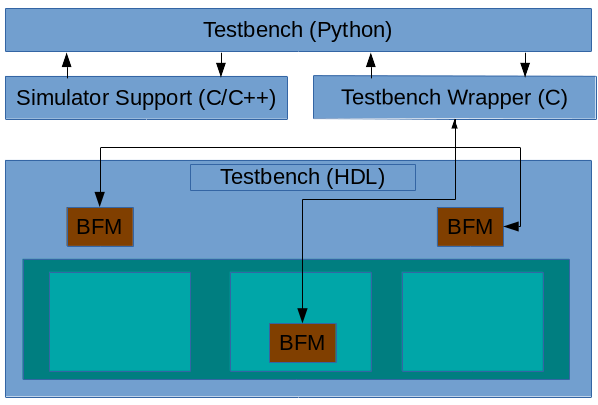
The structure of a Py-HPI enabled testbench is shown above. The key elements are described below
  • Testbench (Python) -- This is Python code the user writes to interact with the design running within the HDL simulation environment
  • Simulator Support -- This is C/C++ code generated by Py-HPI that implements the integration with a specific type of simulator. In general, this code is independent of the specific testbench
  • Testbench Wrapper -- This is C code generated by Py-HPI that implements the testbench specifics of the integration between Python and the HDL environment
  • Bus Functional Models (BFMs) -- BFMs written in HDL (eg SystemVerilog) implement the translation between task calls and signal activity and vice versa.
Currently, Py-HPI supports standard SystemVerilog-DPI simulators (eg Modelsim) as well as Verilator. More integrations are planned, including support for Verilog simulators like Icarus Verilog.

Py-HPI: A Small Example


One easy way to get a sense for the user experience when using Py-HPI is to walk through the steps to run a very simple testbench environment. One of the Py-HPI examples provides just such a testbench.
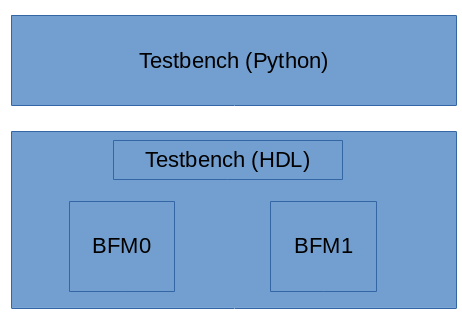
The structure of this testbench environment is shown above. The Python portion of the testbench drives the SystemVerilog HDL testbench via two bus functional models that are instanced in the SystemVerilog environment.

Python Testbench

First, let's take a look at the Python testbench code, which you can find here:
def thread_func_1():
  print("thread_func_1")
  my_bfm = hpi.rgy.bfm_list[0]
  for i in range(1000):
    my_bfm.xfer(i*2)

def thread_func_2():
  print("thread_func_2")
  my_bfm = hpi.rgy.bfm_list[1]
  for i in range(1000):
    my_bfm.xfer(i)

@hpi.entry
def run_my_tb():
    print("run_my_tb - bfms: " + str(len(hpi.rgy.bfm_list)))

    with hpi.fork() as f:
      f.task(lambda: thread_func_1());
      f.task(lambda: thread_func_2());

    print("end of run_my_tb");
Execution starts in the run_my_tb()method (which is marked by a special Python decorator hpi.entry, to identify it as a valid entry point) which starts two threads and waits for them to complete. Each of the thread methods (thread_func_1 and thread_func_2) obtain a handle to one of the BFM instances and call the BFM's API to perform data transfers in the SystemVerilog testbench environment.
In a way, it's almost identical to what I would write in either C++ or SystemVerilog. In a way, that's kind of the point from my perspective.

Running the Testbench

Okay, now that we know what the Python side of the testbench looks like, let's see the commands used to create and compile the files necessary to run a simulation. These commands are in the runit_vl.sh script inside the example directory. In this case, I'll show the commands required to run Py-HPI with the Verilator simulator. The example also provides a script (runit_ms.vl) that runs the same example with Modelsim.

Create the Simulation Support Files

We first need to create the simulation-support files. Since we're targeting the Verilator simulator, we need to run the 'gen-launcher-vl' subcommand implemented by the Py-HPI library.
python3 -m hpi gen-launcher-vl top -clk clk=1ns
Verilator is a bit of an outlier, in that the simulation-support files are specific to the HDL design being simulated. Consequently, we need to specify the name of the top Verilog module and the clock name and period.

Create the Testbench Wrapper

Now, we need to create the Testbench wrapper file that will support the specific BFMs instantiated inside the testbench. 
python3 -m hpi -m my_tb gen-bfm-wrapper simple_bfm -type sv-dpi
python3 -m hpi -m my_tb gen-dpi

Because the Verilator simulator supports DPI, we generate a DPI-based testbench wrapper for our testbench that uses a single BFM. The resulting testbench wrapper is implemented in C and provides the connection between SystemVerilog and Python for our BFM.

Compile Everything

This step is very specific to the simulator being used. 
# Query required compilation/linker flags from Python
CFLAGS="${CFLAGS} `python3-config --cflags`"
LDFLAGS="${LDFLAGS} `python3-config --ldflags`"

verilator --cc --exe -Wno-fatal --trace \
 top.sv simple_bfm.sv \
 launcher_vl.cpp pyhpi_dpi.c \
 -CFLAGS "${CFLAGS}" -LDFLAGS "${LDFLAGS}"

make -C obj_dir -f Vtop.mk
Since we're using Verilator, we need to run Verilator to compile the HDL files and the simulator-support and testbench wrapper C/C++ files. Verilator generates C++ source and a Makefile to build the final simulator image. Our last step is to build the Verilator simulation image using the Verilator-created Makefile.

Run it!

Finally, we can run our simulation.
./obj_dir/Vtop +hpi.load=my_tb +vl.timeout=1ms +vl.trace
We pass a few additional plusargs to enable specific behavior:

  • The +hpi.load=my_tb specifies the Python module to load
  • The +vl.timeout=1ms specifies that the simulation should run for a maximum of 1ms. Other simulators will, of course, provide different mechanisms for doing this
  • The +vl.trace argument specifies that waveforms should be created. Other simulators will provide different ways of turning on tracing.
So, all in all, Py-HPI makes it quite easy to connect a Python testbench to an HDL simulator at the procedural level.

Conclusion

In this blog post, I introduced Py-HPI, a procedural interface between Python and an HDL testbench environment along with an overview of the user experience when creating and running a testbench with Py-HPI. In my next post, I'll look at a Py-HPI testbench for my FWRISC RISC-V core and compare the new Python testbench with the existing C++ testbench. Until then, feel free to check out the Py-HPI library on GitHub (https://github.com/fvutils/py-hpi) and I'd be interested to hear your experiences in using Python for functional verification.


Disclaimer
The views and opinions expressed above are solely those of the author and do not represent those of my employer or any other party.


Saturday, March 2, 2019

Generate Custom Content Quickly with a Template Engine


I was at DVCon earlier this week, and attended the UVM Update Tutorial delivered by Cliff Cummings. Cliff described his typical process of creating UVM elements, which is to have a set of 'golden' template files that can be copied and hand-customized to the task at hand. It's certainly something I've done frequently on UVM projects and in many other contexts as well.

If you work in verification and you're anything like me, you create lots of files pretty much every day. Scripts, UVM code, C++ code, Makefiles, meta-data files, the list goes on and on. While all of these files will contain custom content, there is often a lot of boilerplate content as well. There are certainly specialized tools focused on quickly creating content for specific domains. For example, there are several tools and libraries to help quickly create UVM elements based on some high-level inputs from the user. But, what about files that are custom to your environment? Can we do better than the standard process of copy, rename, and then manually doing a search/replace in each file?

VTE
I've recently been playing with just such a template engine for my own use. For lack of a better name, I've been calling it the Verification Template Engine (VTE), since I'm largely using it for creating files in the context of a verification environment. VTE is implemented in Python and leverages the Jinja2 template engine, which is typically used for creating web content from a template.

Given how much VTE is just reusing existing functionality, what is the value-add? Two things, really:

  • VTE provides a user interface that makes it easy to see what templates are available in the environment
  • VTE specifies a template structure that makes it really easy to create new templates from those 'golden' template files that you would normally copy, rename, and modify.

Using Templates
VTE currently ships a couple of small templates with the tool. Your custom templates will be found via the VTE_TEMPLATE_PATH environment variable.

VTE currently supports two commands: list and generate. The list command shows the set of templates that were found on the template path.

% vte list
project.ivpm.googletest-hdl - IVPM project with Googletest-HDL dependence
verif.ip.googletest-hdl     - IP verification environment using Googletest-HDL
verif.uvm.test              - Creates a UVM test class
The generate command, as you might expect, generates content from a specified template. 

usage: vte generate [-h] [-force] template name [KEY=VALUE [KEY=VALUE ...]]

positional arguments:
  template    ID of template
  name        Name to use in the template
  KEY=VALUE   Specify other template variables

optional arguments:
  -h, --help  show this help message and exit
  -force      force overwrite of existing files

Here's an example using VTE to create the skeleton project structure that I use when developing an IP:

% vte generate project.ivpm.googletest-hdl my_proj
Note: processing template etc/ivpm.info
Note: processing template etc/packages.mf
Note: processing template etc/env.sh
Note: processing template scripts/ivpm.py
Note: processing template scripts/ivpm.mk
% find -type f
./etc/ivpm.info
./etc/packages.mf
./etc/my_proj_env.sh
./scripts/ivpm.py
./scripts/ivpm.mk
Creating Templates

Creating new template is simple as well. VTE. uses a marker file, named .vte to identify the root directory of a template. Any files in that directory or its subdirectories is considered to be a template file. The ID for a template is composed from the path elements between the VTE_TEMPLATE_PATH entry and the directory containing the .vte marker file.

For a very simple template, all you need is an empty .vte marker. However, adding a little information to the .vte file makes your template more useful. For example, you can add a short description for your template, which will be shown with the vte list command is run:

[template]
desc = Creates a UVM test class

The template files, themselves, use Jinja2 markup to refer to template parameters and specify directives.

/****************************************************************************
 * {{name}}.svh
 * 
 ****************************************************************************/
{%set filename = "{{name}}.svh" %}
/**
 * Class: {{name}}
 * TODO: Document UVM Test {{name}}
 */
class {{name}} extends {{base_class}};
 `uvm_component_utils({{name}})
 
 function new(string name, uvm_component parent=null);
  super.new(name, parent);
 endfunction
 
endclass

The example above is a template for a UVM Test class. The {% set filename ... %} directive specifies the name of the output file, which depends on the value of the name parameter. The rest of the template contains a reference to the name parameter wherever we want that to be substituted in. As you can probably guess, these locations where {{name}} is referenced are the very locations that you'd go through with a text editor and manually substitute in some content.


Sound Interesting?
If this all sounds interesting, check out VTE on GitHub: https://github.com/fvutils/vte. You can download a release tarball from the Releases area, add the bin directory to your PATH, and try it out right away. You can also find documentation in the README file.
If you find an issue with VTE, or would like to see it support a new feature, file a ticket on the GitHub issue tracker. Even better, send me a pull request!

My hope is that a tool like VTE can make creating boilerplate code much simpler and faster, allowing you to focus your efforts on adding truly-unique content. That is, after all, always the goal of engineering and automation, right?


Saturday, December 15, 2018

FWRISC: Creating a Unit-test Safety Net


When developing software, I've become very comfortable with test-driven development -- a methodology that calls for tests to be developed along with, or even before, functionality. It's quite common for me to develop a test first, which obviously fails initially, and implement functionality until the test passes.
I have typically approached hardware verification from a very different perspective. When doing verification, I've typically started with a hardware block that is largely functional, or at least is believed to be largely functional. My work then begins with test plan development and some detective work to ferret out the potentially-problematic areas of the design that require targeted tests.

When developing the FWRISC RISC-V core, I initially started off taking a verification approach. One of the requirements for the RISC-V contest was that cores must pass the RISC-V Compliance Tests. So, I started off by attempting to run one of the compliance tests. I quickly realized that there were some challenges with this approach:
  • Even for testing a simple feature, the RISC-V compliance tests are quite complicated. All involve exception instructions. All involve multiple instructions that are unrelated to the instruction that is ostensibly the target of the test. This isn't uncommon for verification, of course.
  • Taking a verification approach early in the development cycle means that debugging is incredibly painful. Tracking down a small issue with the core by looking at the test result of a test that consists of a hundred or so instructions is incredibly painful -- just see the waveform at the top of this blog post which comes from the test for the 'add' instruction.
  • In contrast, see the following waveform that shows the entire 'add' unit test. While it's longer than a single instruction, this test consists of a total of 6 instructions. This means that there's much less to look at when a problem needs to be debugged.


Creating a Testbench

My verification background is SystemVerilog and UVM, so one early complication I faced when developing tests for the Featherweight RISC core was that the RISC-V soft-core context explicitly required the use of Verilator as a simulator. Verilator is, in some senses, a simulator for the synthesizable subset of SystemVerilog. In other senses, it's a Verilog to C++ translator that can be used as to create a C++ version of a synthesizable Verilog description to bind in to a C++ program. Compared to a simulator, think of it, not as a house, but as a pile of lumber, tools, and a blueprint from which you can build a house (which, by the way, is in no way an attempt to minimize the value of Verilator -- just point out some of the required legwork). 

The fact that Verilator produces a C++ model of the SystemVerilog RTL brought to mind the unit-testing library that I invariably use when testing C++ code. Googletest is a very handy library for organizing and executing a suite of C++ unit tests:
      • Collects and categorizes tests
      • Enables common functionality to be centralized across tests
      • Provides result-checking macros/assertions
      • Executes an entire test suite, a subset, or a single test
      • Reports test status
In addition to using Googletest for standard C++ applications, I had used the Googletest framework to manage some early device firmware written in C when testing it against Verilog RTL being verified in a UVM testbench. This approach seemed close enough to what I was looking to do with Featherweight RISC and Verilator that I ended up extending that project (named googletest-hdl) to support Verilator. While the contest required the use of Verilator, I wanted to setup my basic test suite such that it could run with other simulators. Since the googletest-hdl project already supported running with SystemVerilog and UVM, I was covered there.

The Featherweight RISC testbench block diagram is shown below:


The design is instantiated in the HDL portion of the testbench. This testbench portion will run in Verilator or another Verilog simulator. The Googletest portion of the testbench contains the test suite and code needed to check test results. There are two points at which the environments communicate: the run-control path by which the Googletest environment instructs the HDL environment to run, and the tracer API path by which events are sent from the processor to the testbench environment.
The tracer API path is the key to checking test results. The following events are sent to the Googletest environment as SystemVerilog DPI calls:
  • Instruction-execution event
  • Register-write event
  • Data-access event
Now that we have this testbench structure, we can create some tests.

Creating Tests

When it comes to unit tests, I usually find that the initial test structure is successively refined as I discover more and more commonality between the tests. Frankly, the ideal unit test is almost-entirely data driven, and the Featherweight RISC tests are very close to this ideal.

The unique aspects of the instruction unit tests are stored in the test files themselves. Here is test for the add instruction:


  • Note the instruction sequence to load registers with literals and perform the 'add'. This is the actual test.
  • The data between 'start_expected' and 'end_expected' contains the registers that are expected to be written. The test harness will read this data from the compiled test.
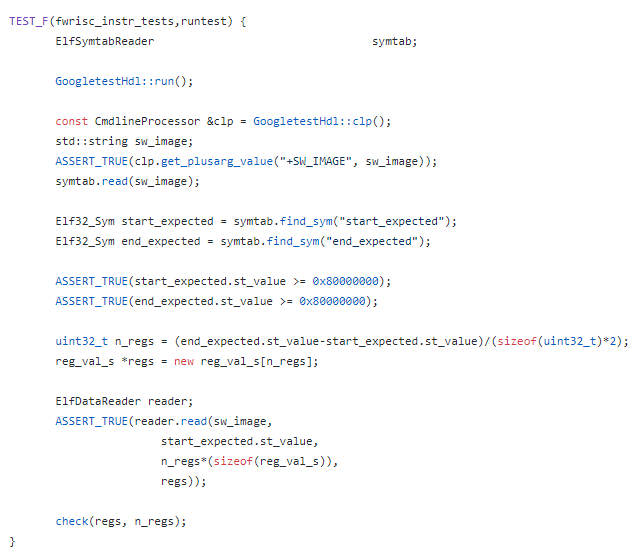
This data-driven test allows our test harness to be fairly simple and completely data driven, as shown below:

  • First, the test harness executes the simulation by calling GoogletestHdl::run()
  • Next, the test harness reads in the compiled test file, which has been specified with the +SW_IMAGE=<path> option
  • The start_expected..end_expected range is located and read in
  • Finally, the register contents are checked against the expected values specified in the test.

Results

After getting the unit-test structure in place, I almost-literally went down the list of RISC-V RV32I instructions and created a test for each as I implemented the instruction. The completed tests provided a nice safety net for catching issues introduced as new instructions were implemented, and as bugs were corrected. More issues were found as the RISC-V compliance tests were brought up and these issues prompted creation of new unit tests. 
The unit-test safety net has been incredibly helpful in quickly identifying regressions in the processor implementation, and helping to identify exactly which instructions are impacted. The unit-test experience also got me thinking about formal verification, and whether this could also be used as a form of unit-test suite. I'm getting ready to take another pass at shrinking the area required for the Featherweight RISC-V, and am thinking about creating a Formal unit-test suite to help in catching bugs introduced by that work. I'll talk about those experiments in a future post.
For now, I have a suite of 67 unit tests and 55 RISC-V compliance tests that provide a very good safety net to catch regressions in the Featherweight RISC implementation.

Disclaimer


The views and opinions expressed above are solely those of the author and do not represent those of my employer or any other party.

Sunday, September 2, 2018

Why Not an IDE?

As anyone (technical) who knows me can attest, I'm a big fan of Integrated Development Environments (IDEs). I've personally focused particularly on the Eclipse IDE, but I'm more generally a fan of the concept -- the notion that the task of developing code is different from the task of typing arbitrary text, and that programmers should be able to take advantage of these differences.

IDEs provide the ability to navigate large codebases with ease (and without grep), to productively leverage other's code without first committing it to memory, and to catch typing mistakes before running off to run a project build. And with an extensible IDE framework like Eclipse (and VSCode, for that matter), a programmer can get these benefits when working with a wide variety of languages -- C++, Java, SystemVerilog, Python, and more.

Recently, however, I've been puzzling over why more people don't use an IDE. What are the factors the hold them back? And, knowing this, what would enable them to get the benefits of an IDE?

Some of the reasons cited for not using an IDE are hard to counter. For example (with slight exaggeration): "I memorize all the code I work with, and don't make mistakes, so an IDE doesn't really provide me any value".

Other reasons hint at the startup efforts required, and the differences in use model. "I couldn't get my project properly configured for the IDE, and gave up after a couple of weeks". "I understand the benefits of an IDE, but my fingers just automatically launch Vi when I want to edit a file. Starting up the IDE seems to take so long!"

I'm particularly interested in this second category of reasons, since I suspect something can be done about these reasons for not getting the benefits of an IDE. I'm actually thinking about somewhat of a hybrid -- a simple editor launched from the shell that brings a fair number of the benefits delivered by a full integrated development environment.

What do you think? What are the reasons you've heard for not using an IDE? If you don't use an IDE, what are your reasons?


Wednesday, January 17, 2018

DVKit: Setting up SystemVerilog Development


In my last post on DVKit, I described how Eclipse uses projects to group source files, and uses workspaces to organize the projects and settings for a given development session. In this post, I'll start to dig into the support that DVKit provides for developing SystemVerilog.

DVKit includes the SVEditor plugin (http://sveditor.org), an open source Eclipse plug-in for developing SystemVerilog files. SystemVerilog is an object-oriented language that has similarities to C++ and Java. Unlike C++ and Java, though, SystemVerilog has strong ordering dependencies between files. C++ files can be independently analyzed because each C++ source file must include its dependencies and specify the namespace its content is in (if any). Java is even a bit more structured, requiring the class name and file name to match, and (effectively) requiring the directory structure to match the package namespace structure.

In contrast, all content in a SystemVerilog package must effectively be included in a single file. The pre-processor provides a level of workaround to enable classes to be stored in a separate file from the package file that includes them. However, this all adds up to make setting up source analysis for a SystemVerilog file a bit more detail-oriented than for other source languages.

In this post, I'll walk through setting up an Eclipse (DVKit) project for the UBus example from the UVM-1.2 library. I downloaded UVM here.

Creating a SystemVerilog Project

As mentioned in the last post, Eclipse makes it easy to create a project around existing source code. In this case, we know we will be working with SystemVerilog source, so we start by creating a new SVE Project. The wizard is found inside the SVEditor category, as shown below.


After selecting the proper wizard for project creation, we need to specify the particulars of the project:


Specifically, in this case:
  • ubus -- The name of the project
  • c:\usr1\fun\dvkit\uvm-1.2\examples\integrated\ubus -- The location of the ubus project within the UVM tree

Specifying Root Files

Since the ubus project contains existing sources, we next want to specify the root files so they can be indexed. SystemVerilog files need to be parsed in a very specific order, so it's important to only process the top-level files.

To do this, we first create a New Filelist on the Filelists page of the new SVE Project wizard. The filelist can be named anything, but the default (sve.f) is fine.


The next page is where the magic happens. 
  • Select the check box next to the 'ubus' project. This will cause all files with a SystemVerilog suffix (.sv, .svh, etc) to be selected
  • Click on the 'Compute Filelist' button. This pre-processes all source files and eliminates any files that are included by another. 
  • The resulting root files are displayed in the Filelist Contents box

Checking out the new Project

At this point, we've specified the root files in our project in such a way that the SVEditor plug-in can locate and parse them. We can now click Finish on the wizard and see the completed project.

Hmm... Okay, so we have a problem. Seems some macros from the UVM library can't be located. Of course, this isn't really surprising given than we haven't told the SVEditor plug-in to parse the UVM files.

Adding External Sources

Eclipse provides several ways to reference project-external source files. The easiest in this case is to just add the UVM library to the filelist that we already created.

We edit the sve.f file that we created during the project-creation process, and add two absolute paths to where we unpacked the UVM bundle:
  • +incdir+<uvm_install>/src
  • <uvm_install>/src/uvm_pkg.sv
After saving the file, we now have a project without errors.

Results


The payoff for properly configuring our SystemVerilog source project is that we can more-productively work with our SystemVerilog sources. In the screenshot above, the hover pop-up is displaying the documentation for the uvm_driver class. 

In future blog posts I'll dig into more features of Eclipse, DVKit, and plug-ins like SVEditor. For now, just a reminder that you can always download the completely open source DVKit here.

Sunday, January 7, 2018

DVKit: Workspaces, Projects, and Legacy Code


In Part 1 of this series, I introduced DVKit, an Eclipse-based IDE for files types used by DV engineers. If you're used to editing your source files with a single-file editor like Vi/Vim or Emacs, moving to an integrated development environment can take some getting used to. Single-file editors don't require any context (in fact, do not take advantage of any context) beyond the file on which they have been invoked. In contrast, IDEs require context for a file in order to provide many of the project-centric features that they provide.

Eclipse, like many integrated development environments, provides a variety of flexible features with which to specify the context of the files being developed. In this post, I'll describe the best practice fundamentals I've developed over the years when setting up development projects. Future posts will explore a few additional features that are very helpful in some cases.


Projects 

Eclipse provides two fundamental features for working with code: projects and workspaces (shown above). A project is represented by a directory that includes the sources being developed and some meta-data files with information about the language (eg Java) being used and how that language should be processed (eg assume Java 7). Some of this information is captured in a file named '.project' that is present in all Eclipse projects, and some will be captured in toolchain-specific files.

An Eclipse session can have multiple projects open at any given time.

Workspaces

Eclipse uses a workspace to capture a development session. A workspace records the projects that are open, the windows that are open and their positions and sizes, etc. In contrast to projects, a workspace typically does not contain any actual code -- just the preferences and settings used while developing code.

Projects are associated with a workspace in two ways:
  • When a project is created, it is automatically added to the active workspace
  • An existing project can be imported into the active workspace
In both cases, a link is added from the workspace to where the project is located on the filesystem. The project and its files will be visible in the workspace, but you are actually editing the files within the project directory, as shown in the diagram above.


I typically create a workspace for each codeline that I'm working on. So, I might have a workspace for "sveditor-master" and one for "sveditor-fast-indexer".

Working with Existing Code

If you're getting started with an Eclipse-based IDE like DVKit, you likely have lots of existing code and no existing Eclipse projects. So where do you start? Well, the good news is that Eclipse projects fit very nicely around existing code. You just need to decide what the primary language for the project is, and create the right project.

Let's say I want to work on files from the Linux Device Tree Compiler (DTC), and that I've cloned a copy of the repository (git://git.kernel.org/pub/scm/utils/dtc/dtc.git) to c:/usr1/fun/dvkit/tutorial/dtc.
After launching DVKit, I would launch the 'New C Project' wizard (New->Project... ) to create a new project for editing C code.


The next wizard allows me to provide specifics about the project I want to work on.


  • What is the project named? 'dtc'
  • Where is it located? On the filesystem at c:/usr1/fun/dvkit/tutorial/dtc
  • How are the source files compiled? With a Makefile
After completing this wizard, the 'dtc' project will be visible in the workspace:


Now the source files from the 'dtc' project are visible in the workspace and available for editing. In the future, we can bring the 'dtc' project into another workspace by running the Eclipse Import wizard to import an existing project.

Conclusion

The Eclipse project construct allows project-specific settings to be associated with source code, while the workspace construct enables users to manage session-specific settings. Eclipse's ability to construct a project around existing source code makes it easy to use Eclipse to develop existing code.

As always, you can download the freely-available Eclipse-based DVKit here: https://sourceforge.net/projects/dvkit/files/

Tuesday, January 2, 2018

DVKit: More-productive Code Development for DV Engineers


If you're a design verification (DV) engineer, how many different languages do you code in every day? If you're like me, the number is significant. On any given day, I might find myself working on SystemVerilog, PERL, shell script, Makefile, even C++. Text editors like Vim and a host of others can edit any text file, and even provide some basic syntax coloring.

How Do Integrated Development Environments Help?

Integrated Developmene Environments (IDEs) provide features far beyond those provided by simple text editors. While a text editor is typically aware of the current file being edited, an IDE is aware of the files related to the current file being edited. An IDE typically provides syntax and semantic checking for code as it is developed, which results in more accurate code creation and fewer mistakes being discovered during compilation. An IDE also provides features for navigating across the content of the code being developed -- for example, navigating to the declaration of a class from its usage. IDEs also provide on-the-fly content assist based on the declarations in the code under development -- for example, prompting the user with the methods available in a specific class.

There are a number of IDEs available, but many tend to focus on a handful of languages. Visual Studio, for example, focuses on C, C++, and C#. NetBeans focuses on Java and web languages. With the large variety of languages used for design verification, we need an IDE with support for the same large variety of languages.

Eclipse

If you're looking for a true integrated development environment (IDE) for multiple languages, the Eclipse platform is a natural choice. Originally developed by IBM as an integrated development environment for Smalltalk and Java, Eclipse has evolved into an open source platform that supports development of a dizzying array of languages -- from Java to C++ to ANTLR and beyond. As an integrated development environment, Eclipse not only provides text editing and syntax highlighting, it provides support for easily navigating code structure. For example, navigating from where a field is used to where it was declared.

DVKit

I've used Eclipse as a primary development tool for the past 12 years or so. Eclipse follows a plug-in-based architecture, and makes it easy to install new plug-ins for developing various languages. So, it's not terribly difficult to "roll your own" installation of Eclipse that contains your favorite plug-ins. About four years ago, I realized that there were two challenges with continuing to roll my own. First, it was time consuming. Remembering the web sites for all my favorite plug-ins and installing them every time a new version of Eclipse was released, on every development machine I use, was a hassle. Second, I didn't have a good way to share my favorite collection of Eclipse plug-ins with others.

So, about four years ago I created DVKit. DVKit is based on Eclipse and packages all my favorite plug-ins for developing languages such as:
  • SystemVerilog
  • PERL
  • Python
  • Shell
  • C/C++
  • Java
  • Javascript
  • Scala
  • Makefile
  • TCL
  • XML
  • YAML
DVKit is available for Linux, Windows, and Mac OS-X. On Windows, an installer is available to make it extra simple.

You can find DVKit at http://dvkit.org, and the downloads page here.

Over the next few blog posts, I'll introduce you to the fundamentals of developing code with DVKit and Eclipse, and some of the language-specific features provided with DVKit. In the meantime, I would encourage you to download DVKit and begin to explore how an IDE can help boost your development productivity.

Monday, October 2, 2017

Designing Standard-protocol Interfaces with Chisel Bundles


Standard interfaces are all around us, and enhance interoperability between devices created by different organizations. While some standard interfaces are quite niche in nature, others, like the unbiquitous phono jack, have been used for many applications that are only slightly related. 
When it comes to design and reuse of design IP, using higher-level interfaces (certainly higher-level that just a set of wires) helps to make use and reuse of the IP easier. An IP that connects with the rest of the design via interfaces is easier to understand than a block that has a wire-level interface -- even if those hundreds of wires are equivalent to several high-level interfaces. Connecting an IP with top-level interfaces to the rest of the design is much easier and trouble-free than individually connecting hundreds of signals. 
SystemVerilog provides the interface construct as both a design and a verification feature. A SystemVerilog interface describes the low-level signals of which the interface is composed. The ways in which those signals can be used (eg initiator vs target) are captured using a modport. 

interface wb_if #(
              parameter int WB_ADDR_WIDTH = 32,
              parameter int WB_TGA_WIDTH = 1,
              parameter int WB_DATA_WIDTH = 32,
              parameter int WB_TGD_WIDTH = 1,
              parameter int WB_TGC_WIDTH = 1
              );
      
       reg[(WB_ADDR_WIDTH-1):0]                 ADR;
       reg[(WB_TGA_WIDTH-1):0]                  TGA;
       reg[2:0]                                 CTI;
       reg[1:0]                                 BTE;
       reg[(WB_DATA_WIDTH-1):0]                 DAT_W;
       reg[(WB_TGD_WIDTH-1):0]                  TGD_W;
       reg[(WB_DATA_WIDTH-1):0]                 DAT_R;
       reg[(WB_TGD_WIDTH-1):0]                  TGD_R;
       reg                                      CYC;
       reg[(WB_TGC_WIDTH-1):0]                  TGC;
       reg                                      ERR;
       reg[(WB_DATA_WIDTH/8)-1:0]               SEL;
       reg                                      STB;
       reg                                      ACK;
       reg                                      WE;

       modport master(
                     output        ADR,
                     output        TGA,
                     output        CTI,
                     output        BTE,
                     output        DAT_W,
                     output        TGD_W,
                     input         DAT_R,
                     output        TGD_R,
                     output        CYC,
                     output        TGC,
                     input         ERR,
                     output        SEL,
                     output        STB,
                     input         ACK,
                     output        WE);
      
    ...             

endinterface

An example of a Wishbone SV interface is shown above, with just the 'master' modport shown. As you can see, parameters are specified on the interface declaration, core signals are declared without direction, and directions for different uses of the signals are specified via modport declarations.

Chisel provides the Bundle construct to group signals together. While the concept and high-level use of a Chisel Bundle is quite similar to a SystemVerilog interface, there are some significant differences. This blog captures the best practices that I've discovered thus far while describing Chisel bundles for standard interfaces.

SV Interfaces vs Chisel Bundles

If you've spent time working with SystemVerilog interfaces already, understanding the differences between SV Interfaces and Chisel Bundles will likely make the best practices below make more sense. 

While SystemVerilog provides the modport construct for describing a usage of a interface, Chisel doesn't have a similar notion. All signals in a Chisel bundle are given a direction. Bundles may be instantiated as-is, or instantiated 'Flipped' with reversed signal directions.

Chisel bundles can be hierarchical, so a bundle type can be composed of several instances of other bundle types. In contrast, a SystemVerilog interface must effectively be single-level.

Being an object-oriented language, Chisel allows methods to be defined on a bundle type that assign values to the bundle signals. This can be very useful by making it easy for the user of a bundle type to drive the bundle signals to a useful state.

Chisel Bundle Best Practices

At the end of this blog post is a Chisel description of a Wishbone interface, which I'll refer to in the best practices description below.

Describe from the Initiator's Perspective

Since signal directions are specified on the signals of a Chisel bundle, it's helpful to be consistent in picking either the initiator or the target and describing all interfaces in those terms. I've picked the initiator as the standard perspective to use. 
Note that the Wishbone signal directions are captured from the initiator's (master's) perspective. For example, ADR and CYC are outputs, while DAT_R and ACK are inputs.

Collect Related Signals in a Sub-Bundle

Users of a standard interface will often benefit from working with sub-elements of the protocol. Declaring this sub-elements as part of the interface declaration can be very helpful. Since some Chisel elements (such as the Mux) expect all elements of a bundle to have the same direction, it's important that all elements of a sub-bundle have the same direction. In the Wishbone example above, I've created a 'ReqData' bundle to capture all signals related to the transaction request, and a 'RspData' bundle to capture all signals related to the transaction response.

Collect Protocol Parameters into a Parameters Class

Standard protocols are often parameters. For example, the Wishbone address, data, and tag widths are variable. Collecting protocol parameters into a class, instead of passing them individually to the bundle constructor, has two key benefits:
  • Less typing when creating multiple instances of the interface with the same parameterization
  • It's easier to create the 'cloneType' method (see next tip), and this can even be placed in a base class if you prefer

Define a cloneType Method

Chisel needs to clone Bundle objects for several reasons. A parameterized standard interface bundle must provide a cloneType method to ensure that the proper parameters are used when the interface bundle is cloned. You can see the definition of the cloneType method above.

Provide tieoff and tieoff_flipped Methods

It should be easy for any users of a standard interface to tie-off that interface. In other words, effectively disable the interface. The tieoff() method is used for initiator interfaces. As you can see, tieoff() drives the response signals to inactive values. The tieoff_flipped() method is used for target interfaces. As you can see, tieoff_flipped() drives the request signals (ADR, CYC, etc) to inactive values.

Note that if a clock or reset must be applied to an interface for it to function properly, the tieoff() method can accept handles to these required signals.

Provide Utility Methods

The ability to provide utility methods for driving interface signals to pre-defined states helps minimize the code an IP must write. In the case of Wishbone, setting the error-response state is done directly by the set_error() method. Any IP that needs to return an error can call this method to set the appropriate values.


I've found the best practices above to be helpful in structuring interfaces that are easily reusable. If you've been working with Chisel, what best practices have you discovered in working with Chisel bundles?

Chisel Bundle for a Wishbone Interface

class Wishbone(val p : Wishbone.Parametersextends Bundle {

  val req = new Wishbone.ReqData(p)
  val rsp = new Wishbone.RspData(p)
      
  override def cloneType() : this.type = {
         return new Wishbone(p).asInstanceOf[this.type]
  }   
  def tieoff() {
    rsp.tieoff()
  }
      
  def tieoff_flipped() {
    req.tieoff_flipped()
  }
}
object Wishbone {
class Parameters (
    val ADDR_WIDTH  :  Int=32,
    val DATA_WIDTH  :  Int=32,
    val TGA_WIDTH   :  Int=1,
    val TGD_WIDTH   :  Int=1,
    val TGC_WIDTH   :  Int=1) { }

class RspData(override val p : Wishbone.Parametersextends Bundle {
  val DAT_R = Input(UInt(p.DATA_WIDTH.W))
  val TGD_R = Input(UInt(p.TGD_WIDTH.W))
  val ERR = Input(Bool())
  val ACK = Input(Bool())   

  override def cloneType() : this.type = {
    return new RspData(p).asInstanceOf[this.type]
  }

  def tieoff() {
    DAT_R :0.asUInt();
    TGD_R :0.asUInt();
    ERR := Bool(false);
    ACK := Bool(false);
  }

  def set_error() {
    ERR := Bool(true);
    ACK := Bool(true);
  }
}

class ReqData(override val p : Wishbone.Parametersextends Bundle {
  val ADR = Output(UInt(p.ADDR_WIDTH.W))
  val TGA = Output(UInt(p.TGA_WIDTH.W))
  val CTI = Output(UInt(3.W))
  val BTE = Output(UInt(2.W))
  val DAT_W = Output(UInt(p.DATA_WIDTH.W))
  val TGD_W = Output(UInt(p.TGD_WIDTH.W))
  val CYC = Output(Bool())
  val TGC = Output(UInt(p.TGC_WIDTH.W))
  val SEL = Output(UInt((p.DATA_WIDTH/8).W))
  val STB = Output(Bool())
  val  WE = Output(Bool())
      
  def tieoff_flipped() {
    ADR := 0.asUInt()
    TGA := 0.asUInt()
    CTI := 0.asUInt()
    BTE := 0.asUInt()
    DAT_W :0.asUInt()
    TGD_W :0.asUInt()
    CYC := Bool(false)
    TGC := 0.asUInt()
    SEL := 0.asUInt()
    STB := Bool(false)
    CYC := Bool(false)
    WE := Bool(false)
  }

  override def cloneType() : this.type = {
    return new ReqData(p).asInstanceOf[this.type]
  }   
}
}