Showing posts with label UCIS. Show all posts

Sunday, July 17, 2022

PyUCIS: Manipulating Coverage Data


In a prior post, we looked at how to inspect coverage as a text report and export coverage data using the PyVSC API, and view coverage graphically using the PyUCIS-Viewer. Recent enhancements have enabled the PyUCIS library to provide even more ways to manipulate coverage data. Over the next couple of posts, we’ll look at those enhancements. 

New ‘ucis’ Command

PyUCIS is a library for working with the Accellera UCIS data model. It started as a library for other applications and libraries, such as PyVSC and the PyUCIS Viewer, to use to read and write data using the UCIS data model. Recent enhancements have added standalone functionality which can meaningfully be accessed from the command line. 

You can find documentation for the ucis command and sub-commands in the PyUCIS documentation. Fundamentally, there are four key operations:

  • Convert coverage data from one format to another
  • Merge coverage data from multiple databases into a single database
  • Produce coverage reports in various formats
  • Obtain information about available coverage data and report formats

These commands are just a starting point. They will be enhanced over time, and more commands may be added as well. If you have suggestions for new commands and/or new capabilities for existing commands, feel free to add an enhancement request on the PyUCIS GitHub page.

Plug-in Framework

PyUCIS has added a plug-in framework with support for database formats and report formats. The goal is to make commands operating on coverage data extensible extensible from the beginning, as well as to enable the set of supported coverage-data formats and report formats to be easily extended without changing PyUCIS.  I’ll devote a future post to the plug-in framework. For now, the ucis command supports listing the available coverage-data and report plug-ins. For example:

% ucis list-db-formats

libucis - Reads coverage data via an implementation of the UCIS C API

xml     - Supports reading and writing UCIS XML interchange

yaml    - Reads coverage data from a YAML file


New Input Format

One often-requested PyUCIS feature is the ability to merge coverage data from several input coverage databases into a single resulting coverage database. One of the first challenges I faced in implementing this functionality was how to write tests. The UCIS API is written with applications in mind. I’ve found it to be a pretty-verbose API when it comes to writing tests. Consequently, tests written directly in terms of the API aren’t particularly easy to follow from a code perspective.

I decided to define a YAML format to make it simpler to capture coverage data in an easy-to -read way. Initially, this was just for testing. However, it may also be a useful interchange format that is less verbose and complex (also, quite possibly, more simplistic) that the XML interchange format defined by the UCIS standard.


A simple coverage specification is shown above. This coverage data describes a covergroup type (my_cvg) with a single instance (i1). A single coverpoint (cp1) has two bins (b1, b2) of which one has a single hit and one has no hits. While this coverage specification was created to make setting of test coverage data simpler for a human, I believe it may also be useful as a simple coverage-interchange format. If you find it useful, please let the community know via the Discussion forum on the PyUCIS GitHub page.

You can find more details on the YAML Coverage Data Format reference documentation page. 

Merging Coverage Data

One consistently-requested feature for PyUCIS is the ability to merge multiple databases into a single unified coverage database. PyUCIS now supports basic merge functionality. Currently, PyUCIS performs a union merge where all unique coverage features found in all the input databases are propagated to the output database. I anticipate that more merge algorithms will need to be added over time, but hopefully this is a good start.


Let’s take a look at a very simple case. Let’s say we have two coverage-data sets shown below:
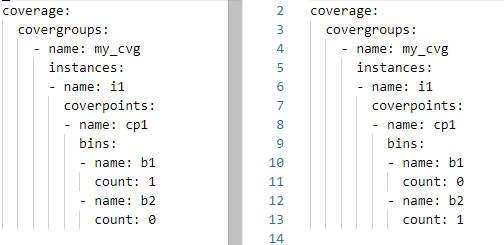

The structure of these two coverage databases is the same (same covergroup type, instance, and coverpoint). Each coverage database has 50% coverage. Let’s merge these two databases and report the coverage.

% ucis merge -if yaml -o merge.xml coverage_1.ycdb coverage_2.ycdb

We specify the two input databases, as well as their format (yaml). We specify the output database as merge.xml.

The resulting coverage report on the merged database will report 100% coverage, as expected:

% ucis report merge.xml

TYPE i1 : 100.000000%

    CVP cp1 : 100.000000%

Reporting Coverage Data

Reporting is a key activity when working with coverage data. We’ve looked at the ability to browse coverage data graphically using the PyUCIS-Viewer, but getting a textual report is every bit as important. In addition to presenting information concisely, textual reports can be processed programmatically to extract key pieces of data. 

We can list the currently-available report plugins using the ucis command:

% ucis list-rpt-formats

json - Produces a machine-readable JSON coverage report

txt  - Produces a human-readable textual coverage report


The default report is textual. Let’s create a textual report on the YAML coverage-data above:

% ucis report -if yaml coverage.ycdb 


Note that we need to specify the format of the input data (yaml). The result is a simple human-readable report of the coverage data in the database.

What if we wanted to post-process the data using a script? We certainly could extract what we need by parsing the output above, but working with data in a machine-readable format is often much simpler. Let’s report our data in JSON format:

% ucis report -if yaml -of json coverage.ycdb 

Obviously, the data is less compact and more verbose. But, reading this into a Python script for further post-processing is incredibly simple! If you’re interested in the JSON report format, have a look at the schema documentation <https://pyucis.readthedocs.io/en/latest/reference/coverage_report_json.html>.

So, for now, PyUCIS supports two textual report formats, and would benefit from more report formats. For example, a plain HTML report and a fancy interactive web-based report. If someone in the community has the skills and is interested, the project would definitely be interested!

Next Steps

PyUCIS continues to evolve, adding a more more hopefully-useful features at a time. Stay tuned for a future post on the plug-in interface, and the addition of more coverage-database and report formats. 


Copyright 2022 Matthew Ballance

The views and opinions expressed above are solely those of the author and do not represent those of my employer or any other party.

Saturday, April 25, 2020

Python Verification: Working with Coverage Data


Before jumping into this week's post, I wanted to offer a bit of an apology to my readers. I recently realized that, despite being a Google property, Blogger only notifies authors of comments for moderation if the author has specifically registered a 'moderator' email with the site. So, apologies to those of you that have commented on posts directly on the Blogger site and watched those comments hang out in limbo indefinitely. I should now receive notifications of new comments.

In my last post, we looked at modeling and sampling functional coverage in Python using the Python Verification Stimulus and Coverage (PyVSC). In that post, I showed how a textual coverage report could be generated to the console by calling an API. But, there is much more that we want to do with functional coverage data. The key question is: how do we store and manipulate it?

Storing Coverage Data

There are two big motivations for storing coverage data. The first is that we often wish to aggregate coverage across a large number of tool runs. In order to do that, we need a way to persist the coverage data collected by each individual tool run. The second is that we want to run analysis on the collected and aggregated coverage data. We want a way to browse through the data interactively, and create nice-looking reports and charts.

Standard Coverage Models

Storing coverage data isn't much different than storing any other data. The first big question to answer is whether there is a standard way of of representing the data, or whether we need to invent one. While I've certainly had fun in the past inventing new formats for representing and storing data, considering all the requirements and designing in appropriate features to represent all the key features of a given type of data is a time consuming problem. Certainly something that should be undertaken as a last resort.

The good news is that there are several existing formats for representing coverage. The bad news is that the vast majority are focused on representing code coverage data (eg Coburtura), not functional coverage data. That said, there is one industry standard for representing functional coverage and code coverage: Accellera Unified Coverage Interoperability Standard

While the  UCIS defines several things, it doesn't define a standard database format. That said, what it does define is very useful. Specifically it defines:
  • A data model for representing functional coverage, code coverage, and assertion coverage
  • A C-style API for accessing and modifying this data model
  • An XML interchange format to assist in moving data from one database implementation to another. In a pinch, the XML interchange format can even be used as a very simplistic database.
Design is tough, so it's almost always most efficient to make use of the work of a committee of smart and capable people instead of starting over. UCIS is certainly not perfect. There are some "bugs" in the spec, and some internal inconsistencies. That said, it's far better than starting with a blank sheet of paper. The next challenge was adapting UCIS to Python.

PyUCIS Library

Much of my work recently has been in Python, so I wanted a way to work with the UCIS data model in Python. The PyUCIS library is a pure-Python library for working with the UCIS data model. A block diagram of the architecture is shown below. 


Front-End API

The core of the PyUCIS library is an implementation of the UCIS API. Remember that the API defined by the UCIS is a C-style API, while Python is much more object-oriented. I initially decided to implement just an object-oriented version of the UCIS API, but then realized that reusing existing code snippets written in C would be much harder without an implementation of the C-style API. Fortunately, building a C-style compatibility API on top of the object-oriented one was fairly straightforward.

Backend

The PyUCIS library uses a back-end to store the data being accessed via the front-end API. The PyUCIS library currently implements two back ends: an in-memory back-end, and an interface to existing C-API implementations of the UCIS API.

The in-memory back-end stores coverage data in Python data structures. While it's not possible to persist the data model directly, the contents can be saved to and restored from the XML interchange format specified by the UCIS.

The C-library back-end uses the Python ctypes library to call the UCIS C API as implemented by a tool-specific shared library. This allows PyUCIS to access data in databases implemented by tools that support UCIS.

While PyUCIS doesn't currently implement its own native database for storing coverage data, it's likely that it will in the future. Fortunately, Python provides an SQLite database as part of the core interpreter installation. Stay tuned here.

Built-in Apps

The final part of the PyUCIS library are a set of built-in apps. These are used to perform simple manipulations on the coverage data and create outputs. Currently, PyUCIS only contains one built-in app: reading and writing the UCIS XML interchange format. That said, there are a couple planned on the roadmap:
  • A merge app to combine data from multiple UCIS data models
  • A report app to produce a textual or HTML coverage report

PyUCIS Apps

The top layer of the PyUCIS architecture diagram are external applications that use the PyUCIS API. At the moment, there is only one and it's a proof of concept. PyUCIS Viewer is a Python Qt5-based GUI for viewing coverage data.


While the viewer is certainly primitive (and incomplete) at the moment, hopefully this provides some ideas for what can be done with the data accessed via the PyUCIS API.

Next Steps

PyUCIS is a pretty early-stage tool. I'm using it to save coverage data from the PyVSC library, and to produce some simple text coverage reports, but there's still quite a bit to do. As always, if you'd like to contribute to this or other projects, I'd welcome the help. 
In the next post, I'll return the Python Verification Stimulus and Coverage (PyVSC) library to look at modeling constrained-random stimulus. Until then, stay safe!

Disclaimer
The views and opinions expressed above are solely those of the author and do not represent those of my employer or any other party.