Showing posts with label EDA. Show all posts

Tuesday, December 31, 2019

2019 - The "Nights and Weekends Projects" Year in Review


It's almost the end of 2019, and I've been thinking back over the year as well as thinking ahead to 2020. In past years, I've often evaluated my "nights and weekends" projects using the same metrics I'm evaluated on at work: projects completed, and results obtained. This year, I've started looking my my "nights and weekends" efforts through a different lens focused more on the knowledge I've gained than just what I've produced.
As an aside, given the cover image, I do find it somewhat ironic that almost none of the knowledge I gained this year came from printed and bound books. Growing up with a love of libraries, and the fascinating collections of books they contained, it's both sad to think that knowledge is no longer concentrated there, and amazing to realize what a wealth of knowledge is now so easily-accessible just a short search away.

Looking back, there are two themes that run through several areas that I worked in across the year. The first of these is making software more modular, collaborative, and accessible. The second is Python. That's not all, though. So, let's get right to it!

Software Packaging and Distribution
Professionally, I come from a standard commercial-software background, and have often looked at open source through a similar lens. Specifically, I've often focused on software that can be packaged such that it's easily accessible to end users. This means bundling dependencies, providing installers, etc (see DVKit, a 'batteries-included' IDE for verification engineers).

This application-centric approach works well so long as the elements of functionality being distributed are relatively small in number, and the ways in which they need to be combined are fairly limited. This approach breaks down when the elements of functionality are relatively large in number, and need to be combined in many ways. In short, the more modular software becomes, the less feasible typical application-centric packaging becomes.

I've been dabbling for a few years in RTL design and verification. In this space, the verification environment for a given design will depend on many small elements of functionality -- utility libraries, reusable verification IP, etc. Bundling the dependencies with the verification environment quickly leads to projects that require lots of disk space. On the other hand, forcing users to download and install all the dependencies presents a significant barrier to new users.

One of the biggest reasons that I've spent so much time with Python this past year is that the Python ecosystem appears to provide a solution to this challenge of packaging and easily distributing small elements of functionality. Over the course of the year, I've spent time looking at Conda as a way of making application-level features more modular and easily-accessible. I've also spent time learning about how to package Python extension libraries (both with and without native library components) for distribution on PyPi, a repository for distributing Python packages.


New Approaches to Embedded DSLs
I've been involved in several projects over the years that have used C++ to provide a language-like user experience via C++ overloaded operators and macros. While there are certainly downsides to these embedded domain-specific languages in terms of error messaging and extensibility, an embedded domain-specific language can be a great way to prototype a language-based user interface before committing to the work of defining a first-class language and creating the parsing and processing infrastructure. It's also a very helpful approach for exploring new techniques in the context of existing languages.

C++ support for macros and operator overloading have been used for embedded DSLs from the beginning. However, using just these features tends to lead to somewhat awkward syntax, since operator overloading only supports expressions. C++11 (and beyond) brings new features, such as lambda expressions, and I spent time investigating these mechanisms and their impact on supporting expressing more-complex constructs in a more-natural way.

While the new C++11 features definitely showed promise, I started to wonder what support Python provided for implementing embedded domain-specific languages. As it turns out, Python provides some very powerful capabilities. Python supports overloading more operators than C++, and supports introspection into the code described by the user. I definitely intend to revisit embedded domain-specific languages captured in Python in 2020!

Constraint Solvers
Highly-capable constraint solvers that are available under permissive open-source licenses are becoming widely available, and I'm seeing these solvers applied to a range of interesting tasks. The CRAVE library for generating random stimulus has been around for some time. Several tools are leveraging available SMT solvers for model checking. Constraint solvers are even being applied for graphical layout of diagrams!

Given the range of applications to which solvers lend themselves, I thought it would be worth having a bit more hands-on knowledge. I spent some time learning about the Z3 solver API before concluding that, while the API is elegant and comprehensive, it's also more-complicated that what I need. I subsequently shifted to looking at the Boolector solver API, which is smaller and simpler.

The Boolector solver provides a Python binding, which is built along with the solver. This means that a user needs to manually build Boolector in order to use a Python package that uses the Boolector solver. Fortunately, I'd been learning about packaging and distributing Python extension libraries, and this this provided a perfect place to try this out. The Boolector Python library (PyBoolector) on PyPi is the result of this work.

Python for Verification
My background in verification is rooted in SystemC, SystemVerilog, and UVM. All very mainstream languages and methodologies in the commercial design and functional verification space. As I spent more time exploring Python and the modular and collaborative packaging it supports, I concluded that it made sense to investigate using Python for functional verification.

I spent time learning about cocotb, the most popular functional verification library in Python that I'm aware of. I also spent time learning about Python's back-end C API and how to structure bus-functional models to integrate at the procedure level with Python.

Actually, the more time I spend looking at Python for verification, the more possibilities I see. Definitely look for more on this topic in 2020!

In most areas, I've been quite happy with Python for verification. The object-oriented language features fit the requirements for high-level verification, and the easy availability of utility packages simplifies dealing with project dependencies. The one thing I've been dissatisfied with is support for static checking. I've used statically-typed languages for most application development. These languages have the advantage that the compiler can identify misuse of types before running the application. Dynamically-typed languages, such as Python and TCL, end up discovering type-misuse issues (eg passing an object to a method that expects an object of a different type) at runtime. One target for 2020 is learning more about what can be done to address this issue. Lint tools such as Pylint help, and my hope is to discover more tools and methodologies that help to close this gap.

RTL Design Skills
When I undertook the 2018 RISC-V Soft Core Contest, It had been quite a few years since I'd done any RTL design. Going through the design work for that project helped me brush up my skills quite a bit, but I knew I had quite a ways to go to be proficient. When the 2019 contest, centered around software security, came along, I knew it was a good opportunity to both learn more about software security vulnerabilities and improve my RTL design skills.

In addition to improving my RTL design skills, I learned a couple of things from initially attempting to add a few new features (multiplication, compressed instructions, security extensions) to my 2018 soft core. First, I had succeeded at writing some very good spaghetti RTL that wasn't modular enough to support extensibility. Furthermore, I didn't have sufficient tests to effectively and efficiently catch bugs introduced by adding new features.

Over the course of the 2019 project, I did a complete rewrite of the Featherweight RISC core. The more-modular structure of the rewritten core lends itself even better to bounded model checking, and I found this to be extremely helpful in catching and diagnosing bugs introduced during development and integration.

Going through this process also helped to improve my knowledge of RTL constructs that result in good efficient implementation, and which do not.


Looking Forward
2019 has been a great year for learning about more corners of the technical world. Looking forward to 2020, I see more work with Python, transitioning more of my existing projects over to cloud-based continuous integration, and more work with Python in the functional verification space. What will I learn along the way? Stay tuned for more blog posts across 2020 to find out!

As we come to the end of 2019 and the beginning of a new year (and new decade), I wish you happy holidays, a happy new year, and a 2020 ahead that is full of learning!

Disclaimer
The views and opinions expressed above are solely those of the author and do not represent those of my employer or any other party.

Sunday, June 16, 2019

Py-HPI: Applying Python for Verification


Intro
In my last post, I talked about a prototype procedural interface between Python and HDL that enables cross-calling between Python and SystemVerilog. My primary motivation for investigating a procedural interface was its potential to maximize performance. In this post, I create a Python testbench for a small IP and compare it to the equivalent C++ testbench. I also look at the performance of Python for verification.

Creating a Python Testbench
My go-to IP for trying out new verification techniques is a small 32-bit RISC-V core named Featherweight RISC (FWRISC) that I created for a design contest last year. The original testbench was written in C++, so that will be my baseline for comparison. If you're interested in the structure of the testbench, have a look at this post.

Since I was keeping the testbench structure the same, I didn't expect much in terms of a reduction in lines of code. C++ is a bit verbose, in that it expects a header and implementation file for each class. This contributes to the fact that each C++ test is roughly twice as long as each Python test:

  • C++ Test: 328 lines
  • Python Test: 139 lines
Reducing the lines of code is a good thing, since more code statistically means more bugs, and spending time finding and fixing testbench bugs doesn't help us get our design verified. But, that's just the start.

The unit tests for FWRISC are all self-checking. This means that each assembly file contains the expected value for registers modified by the test. You can see the data embedded below between the start_expected and end_expected labels.


entry:
li x1, 5
add x3, x1, 6
j done
// Expected value for registers
start_expected:
.word 1, 5
.word 3, 11
end_expected:

Because I didn't want to need to install an ELF-reading library on every machine where I wanted to run the FWRISC regression, I wrote my own small ELF-reading classes for the FWRISC testbench. This amounted to ~400 lines of code, and required a certain amount of thought and effort.

When I started writing the Python testbench, I thought about writing another ELF-reader in Python based on the code I'd written in C++... But then I realized that there was already a Python library for doing this called pyelftools. All I needed to do was get it installed in my environment (more on that in a future post), and call the API:

with open(sw_image, "rb") as f:
elffile = ELFFile(f)
symtab = elffile.get_section_by_name('.symtab')
start_expected = symtab.get_symbol_by_name("start_expected")[0]["st_value"]
end_expected = symtab.get_symbol_by_name("end_expected")[0]["st_value"]
section = None
for i in range(elffile.num_sections()):
shdr = elffile._get_section_header(i)
if (start_expected >= shdr['sh_addr']) and (end_expected <= (shdr['sh_addr'] + shdr['sh_size'])):
start_expected -= shdr['sh_addr']
end_expected -= shdr['sh_addr']
section = elffile.get_section(i)
break
data = section.data()

That's a pretty significant savings both in terms of code, and in terms of development and debug effort! So, definitely my Python testbench is looking pretty good in terms of productivity. But, what about performance?

Evaluating Performance
Testbench performance may not be the most important factor when evaluating a language for use in verification. In general, the time an engineer takes to develop, debug, and maintain a verification environment is far more expensive than the compute time taken to execute tests. That said, understanding that performance characteristics of any language enables us to make smarter tradeoffs in how we use the language. 


I was fortunate enough to see David Patterson deliver his keynote A New Golden Age for Computer Architecture around a year ago at DAC 2018. The slide above comes from that presentation, and compares the performance of a variety of implementations of the computationally-intensive matrix multiply operation. As you can see from the slide, a C implementation is 50x faster than a Python implementation. Based on this slide and the anecdotal evidence of others, my pre-existing expectations were somewhat low when it came to Python performance. But, of course, having concrete data specific to functional verification is far more useful than a few anecdotes and rumors.

Spoiler alert: C++ is definitively faster than Python.

As with most languages, there are two aspects of performance to consider with Python: startup time and steady-state performance. Most of the FWRISC tests are quite short -- in fact, the suite of unit tests contains tests that execute less than 10 instructions.This gives us a good way to evaluate the startup overhead of Python. In order to evaluate the steady-state performance, I created a program that ran a tight loop with 10,000,000 instructions. The performance numbers below all come from Verilator-based simulations.

Startup Overhead
As I noted above, I evaluated the startup overhead of Python using the unit test suite. This suite contains 66 very short tests. 

  • C++ Testbench: 7s
  • Python Testbench: 18s
Based on the numbers above, Python does impose a noticeable overhead on the test suite -- it takes ~2.5x longer to run the suite with Python vs C++. That said, 18 seconds is still very reasonable to run a suite of smoke tests.

Steady-State Overhead
To evaluate the steady-state overhead of a Python testbench, I ran a long-loop test that ran a total of 10,000,000 instructions.

  • C++ Testbench: 11.6s
  • Python Testbench: 109.7s
Okay, this doesn't look so good. Our C++ testbench is 9.45x faster than our Python testbench. What do we do about this?

Adapting to Python's Performance
Initially, the FWRISC testbench didn't worry much about interaction between the design and testbench. The fwrisc_tracer BFM called the testbench on each executed instruction, register write, and memory access. This was, of course, simple. But, was it really necessary?

Actually, in most cases, the testbench only needs to be aware of the results of a simulation, or key events across the simulation. Given the cost of calling Python, I made a few optimizations to the frequency of events sent to the testbench:

  • Maintain the register state in the tracer BFM, instead of calling the testbench every time a write occurs. The testbench can read back the register state at the end of the test as needed.
  • Notify the testbench when a long-jump or jump-link instruction occurs, instead of on every instruction. This allows the testbench to detect end-of-test conditions and minimizes the frequency of calls
With these two enhancements to both the C++ and Python testbenches, I re-ran the long-loop test and got new results:

  • C++ Testbench: 4s
  • Python Testbench: 5s
Notice that the C++ results have improved as well. My interpretation of these results is that most of the time is now spent by Verilator in simulating the design, and the results are more-or-less identical.

Conclusions
The Python ecosystem brings definite benefits when applying Python for functional verification. The existing ecosystem of available libraries, and the infrastructure to easily access them, simplifies the effort needed to reuse existing code. It also minimizes the burden placed on users that want to try out an open source project that uses Python for verification.

Using Python does come with performance overhead. This means that it's more important to consider how the execution of the testbench relates to execution of the design. A testbench that interacts with the design frequently (eg every clock) will impose much greater overhead compared to a testbench that interacts with the design every 100 or 1000 cycles. There are typically many optimization opportunities that minimize the performance overhead of a Python testbench, while not adversely impacting verification results.

It's important to remember that engineer time is much more expensive than compute time, so making engineers more productive wins every time. So, from my perspective, the real question isn't whether C++ is faster than Python. The real questions are whether Python is sufficiently fast to be useful, and whether there are reasonable approaches to dealing with the performance bottlenecks. Based on my experience, the answer is a resounding Yes. 

Disclaimer
The views and opinions expressed above are solely those of the author and do not represent those of my employer or any other party.

Saturday, June 8, 2019

Py-HPI: A Procedural HDL/Python Integration


As I mentioned in my last post, I've been looking at using Python for more tasks, including functional verification. My go-to languages for functional verification have traditionally been SystemVerilog for professional work, and C++ when I'm working on a personal project. I've started doing more of my small-application development in Python (often as an alternative to C++), and have wondered whether I could also migrate my testbench development from C++ to Python as well.

This blog post provides an introduction to an integration I created between Python and an hardware descriptin language (HDL) simulation environment called Py-HPI (for Python HDL Procedural Interface). I'm far from the first to create an integration between Python and an HDL simulator (I'm aware of at least one formal project, and several others users that have written about their integration work), so what is different about Py-HPI?

Well, two things, really in my opinion: 
  • Py-HPI integrates at the procedural level, which means Python can directly call tasks in the HDL environment instead of interacting with signals in the HDL environment. 
  • Py-HPI provides a high degree of automation for setting up this procedural-level integration.
In this blog post, I will be describing the user experience in using Py-HPI. In future blog posts, I'll walk through how Py-HPI integrates on my go-to project for playing with verification technologies, and I'll go more in-depth on how Bus Functional Models (BFMs) and testbench environments are developed for Py-HPI.

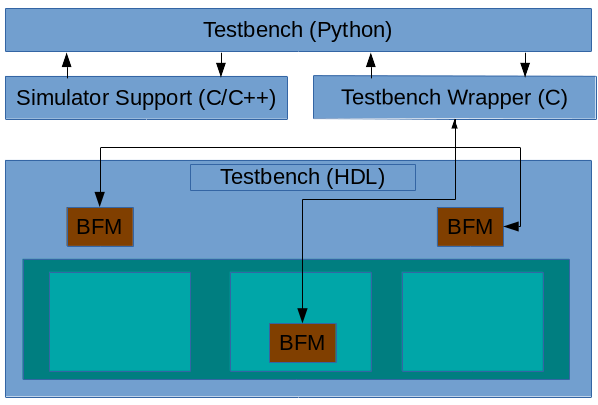
Py-HPI: The Big Picture


The structure of a Py-HPI enabled testbench is shown above. The key elements are described below
  • Testbench (Python) -- This is Python code the user writes to interact with the design running within the HDL simulation environment
  • Simulator Support -- This is C/C++ code generated by Py-HPI that implements the integration with a specific type of simulator. In general, this code is independent of the specific testbench
  • Testbench Wrapper -- This is C code generated by Py-HPI that implements the testbench specifics of the integration between Python and the HDL environment
  • Bus Functional Models (BFMs) -- BFMs written in HDL (eg SystemVerilog) implement the translation between task calls and signal activity and vice versa.
Currently, Py-HPI supports standard SystemVerilog-DPI simulators (eg Modelsim) as well as Verilator. More integrations are planned, including support for Verilog simulators like Icarus Verilog.

Py-HPI: A Small Example


One easy way to get a sense for the user experience when using Py-HPI is to walk through the steps to run a very simple testbench environment. One of the Py-HPI examples provides just such a testbench.
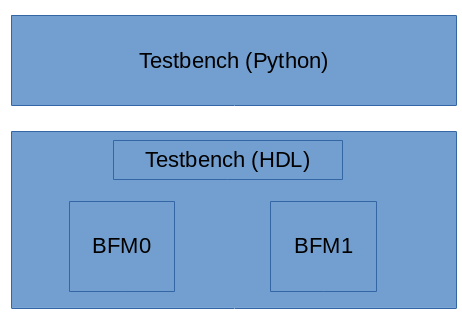
The structure of this testbench environment is shown above. The Python portion of the testbench drives the SystemVerilog HDL testbench via two bus functional models that are instanced in the SystemVerilog environment.

Python Testbench

First, let's take a look at the Python testbench code, which you can find here:
def thread_func_1():
  print("thread_func_1")
  my_bfm = hpi.rgy.bfm_list[0]
  for i in range(1000):
    my_bfm.xfer(i*2)

def thread_func_2():
  print("thread_func_2")
  my_bfm = hpi.rgy.bfm_list[1]
  for i in range(1000):
    my_bfm.xfer(i)

@hpi.entry
def run_my_tb():
    print("run_my_tb - bfms: " + str(len(hpi.rgy.bfm_list)))

    with hpi.fork() as f:
      f.task(lambda: thread_func_1());
      f.task(lambda: thread_func_2());

    print("end of run_my_tb");
Execution starts in the run_my_tb()method (which is marked by a special Python decorator hpi.entry, to identify it as a valid entry point) which starts two threads and waits for them to complete. Each of the thread methods (thread_func_1 and thread_func_2) obtain a handle to one of the BFM instances and call the BFM's API to perform data transfers in the SystemVerilog testbench environment.
In a way, it's almost identical to what I would write in either C++ or SystemVerilog. In a way, that's kind of the point from my perspective.

Running the Testbench

Okay, now that we know what the Python side of the testbench looks like, let's see the commands used to create and compile the files necessary to run a simulation. These commands are in the runit_vl.sh script inside the example directory. In this case, I'll show the commands required to run Py-HPI with the Verilator simulator. The example also provides a script (runit_ms.vl) that runs the same example with Modelsim.

Create the Simulation Support Files

We first need to create the simulation-support files. Since we're targeting the Verilator simulator, we need to run the 'gen-launcher-vl' subcommand implemented by the Py-HPI library.
python3 -m hpi gen-launcher-vl top -clk clk=1ns
Verilator is a bit of an outlier, in that the simulation-support files are specific to the HDL design being simulated. Consequently, we need to specify the name of the top Verilog module and the clock name and period.

Create the Testbench Wrapper

Now, we need to create the Testbench wrapper file that will support the specific BFMs instantiated inside the testbench. 
python3 -m hpi -m my_tb gen-bfm-wrapper simple_bfm -type sv-dpi
python3 -m hpi -m my_tb gen-dpi

Because the Verilator simulator supports DPI, we generate a DPI-based testbench wrapper for our testbench that uses a single BFM. The resulting testbench wrapper is implemented in C and provides the connection between SystemVerilog and Python for our BFM.

Compile Everything

This step is very specific to the simulator being used. 
# Query required compilation/linker flags from Python
CFLAGS="${CFLAGS} `python3-config --cflags`"
LDFLAGS="${LDFLAGS} `python3-config --ldflags`"

verilator --cc --exe -Wno-fatal --trace \
 top.sv simple_bfm.sv \
 launcher_vl.cpp pyhpi_dpi.c \
 -CFLAGS "${CFLAGS}" -LDFLAGS "${LDFLAGS}"

make -C obj_dir -f Vtop.mk
Since we're using Verilator, we need to run Verilator to compile the HDL files and the simulator-support and testbench wrapper C/C++ files. Verilator generates C++ source and a Makefile to build the final simulator image. Our last step is to build the Verilator simulation image using the Verilator-created Makefile.

Run it!

Finally, we can run our simulation.
./obj_dir/Vtop +hpi.load=my_tb +vl.timeout=1ms +vl.trace
We pass a few additional plusargs to enable specific behavior:

  • The +hpi.load=my_tb specifies the Python module to load
  • The +vl.timeout=1ms specifies that the simulation should run for a maximum of 1ms. Other simulators will, of course, provide different mechanisms for doing this
  • The +vl.trace argument specifies that waveforms should be created. Other simulators will provide different ways of turning on tracing.
So, all in all, Py-HPI makes it quite easy to connect a Python testbench to an HDL simulator at the procedural level.

Conclusion

In this blog post, I introduced Py-HPI, a procedural interface between Python and an HDL testbench environment along with an overview of the user experience when creating and running a testbench with Py-HPI. In my next post, I'll look at a Py-HPI testbench for my FWRISC RISC-V core and compare the new Python testbench with the existing C++ testbench. Until then, feel free to check out the Py-HPI library on GitHub (https://github.com/fvutils/py-hpi) and I'd be interested to hear your experiences in using Python for functional verification.


Disclaimer
The views and opinions expressed above are solely those of the author and do not represent those of my employer or any other party.


Sunday, January 13, 2019

EDAPack: Simplifying Development-Tool Management


One of my first "real" engineering courses during my college days centered around scripting and working with Unix, and the professor really emphasized that any repetitive task was a candidate for automation. It's a point that resonated with me at the time, and I continue to question whether any mind-numbing and multi-step process I face should be automated.

Challenges of Managing EDA Tools
One of those mind-numbing processes I've been facing recently is managing my installations of development tools -- specifically, the electronic design automation (EDA) tools that I use to simulate and synthesize Verilog hardware descriptions and develop the embedded software that runs on those devices.
In my experience, EDA tools are a bit different than the standard software that might be installed by default on your Linux workstation:
  • EDA software is enough of a niche market that builds will either just not be available for your Linux distribution, or will be an older version of the software.
  • I often need to install EDA software on machines where I don't have root access, so it wouldn't help me much if the Linux distribution provided a pre-built version of the software
  • I often don't have control over the Linux distribution and version that I have to use. CentOS/RHEL 6, released in 2011, is still quite common and will likely continue to be common since support is offered through 2020.
  • It's often necessary to have several versions of EDA software installed at a given time. Projects often have a dependency on a specific version -- at least until a newer version is validated, so multiple versions must coexist
These challenges, in and of themselves, make maintaining a collection of EDA tools time-consuming.

Challenges of Managing OSS EDA Tools
When it comes to working with open-source EDA tools, there is another level of complexity. These tools are often provided in source form, so they must be installed by the end user. EDA software, like any other, can be complex and can have dependencies on additional software packages. Compiling SymbiYosys, the open-source formal-analysis tool, requires that the source for seven other packages be fetched, compiled, and installed. This is complex enough when the user has administrator access to the machine and can install needed development libraries. Without administrator access, this process becomes incredibly complex. And, of course, when a new version of one of the packages is released, the whole process must be repeated.

Introducing EDAPack
I created EDAPack, which I consider to be in an Alpha state, to address the challenges I describe above. You can think of EDAPack has having two main components, as shown in the diagram below:


First off is the base set of tools, shown in the bottom box. EDAPack contains an installation of Environment Modules, which is a software package that is somewhat-widely used to manage configuring the environment for different software tools. Modules makes it easy to configure the environment with the right mix of tool versions with a minimum of fuss. EDAPack also contains an installation of Python3, a software package that is increasingly required to run open-source software tools, but is somewhat difficult to get correctly-installed on older Linux distributions. Finally, EDAPack contains scripts to manage installation of tools into the EDAPack tree.

The second part of EDAPack is most significant for those of you that are using open-source tools, such as a GCC cross-compiler or one of the open-source Verilog simulators. A key aspect of EDAPack's mission is to provide pre-compiled versions of these packages that can simply be installed and used, skipping all the complexities of installing development libraries and compiling required dependencies. Right now, just a few packages are setup to be used in this way, but the goal is to expand that set based on user demand.

Now, providing pre-compiled software is always an interesting proposition in a Linux environment. Different distributions provide different versions of tool and libraries, making it difficult to deliver software that will run on a variety of distributions. EDAPack compiles packages on CentOS 6, then tests the software on a variety of Linux distributions (courtesy of Docker), ensuring that the software will run correctly on a wide variety of Linux distributions.

How does it Work?
Getting started is actually pretty simple (and that's by design): just download EDAPack from the GitHub release page. After installing EDAPack, you'll want to source a setup script in the EDAPack 'etc' directory (<edapack>/etc/edapack.sh) in order to configure some initial paths.

From there, you'll probably want to install some software. This can be done using the edapack avail command to list software that is available to install:


Once you know which software you'd like to install, the edapack install command is used to  fetch and install the software into the EDAPack tree. For example, edapack install verilator fetches a pre-built version of Verilator from the release area on GitHub and installs it into the EDAPack tree.

Before using software from the EDAPack tree, you will use the module tool (provided by Environment Modules) to list the installed packages and load tools into your environment. Here's the output from module avail, which lists the installed tools. 

We can see that symbiyosys and verilator are installed. We can load a specific version of these tools, or specify the 'latest' version to get the newest installed version.

In other words, simply issuing the command module load verilator/latest will setup our environment to use the latest-installed version of Verilator.

Current Status and Call to Action

Currently, EDAPack is newly-released, provides a bare minimum of packages (Verilator, Icarus Verilog, and SymbiYosys), and provides support for Linux only. EDAPack is useful to me, and I'll continue to evolve it to meet my needs. However, I'm very interested in whether EDAPack could be useful to you as well.

Are you an EDA user? What tools would you like to see delivered in this way? What OS (Linux distro or other) do you use, and would like to ensure is supported?

Are you an author of open-source engineering software? Would you like to have your software made available to users in this way?

Do you have other ideas of what might be possible with a framework like this?

EDAPack is designed to enable hardware and embedded-software developers focus on developing their designs, not on compiling their development tools. I'm interested in your input on whether you feel EDAPack is a useful concept and, if so, what could make it even more useful to you. Feel free to comment on the blog, or file requests on GitHub. What tools are in your pack?